# ABAP for Cloud Development
- [ABAP for Cloud Development](#abap-for-cloud-development)
- [Terms](#terms)
- [Excursions](#excursions)
- [More Information](#more-information)
- [Executable Example](#executable-example)
This ABAP cheat sheet briefly outlines the terms ABAP Cloud and classic ABAP to get an idea about [ABAP for Cloud Development](https://help.sap.com/doc/abapdocu_cp_index_htm/CLOUD/en-US/index.htm?file=abenabap_for_cloud_dev_glosry.htm).
It provides references to more detailed information on the topic.
## Terms
- ABAP Cloud
- Progamming paradigm for state-of-the-art, cloud-ready and upgrade-stable solutions
- ABAP technology (the entire technology provided for and by an ABAP system for developing and executing ABAP-based applications) is used with the following restrictions:
- [ABAP language version](https://help.sap.com/doc/abapdocu_cp_index_htm/CLOUD/en-US/index.htm?file=abenabap_version_glosry.htm):
- The available ABAP language version is [ABAP for Cloud Development](https://help.sap.com/doc/abapdocu_cp_index_htm/CLOUD/en-US/index.htm?file=abenabap_for_cloud_dev_glosry.htm) that presents a [restricted ABAP language version](https://help.sap.com/doc/abapdocu_cp_index_htm/CLOUD/en-US/index.htm?file=abenrestricted_version_glosry.htm).
- [Released APIs](https://help.sap.com/doc/abapdocu_cp_index_htm/CLOUD/en-US/index.htm?file=abenreleased_api_glosry.htm):
- Access to SAP-delivered repository objects is restricted to objects released for ABAP for Cloud Development
- For example, most of the database tables provided by SAP cannot be read directly (although there are abstractions/[CDS entities](https://help.sap.com/doc/abapdocu_cp_index_htm/CLOUD/en-US/index.htm?file=abencds_entity_glosry.htm) for many that can be accessed).
- Libraries are available with predefined functionality.
- Note that repository objects can be classified by a [release contract](https://help.sap.com/doc/abapdocu_cp_index_htm/CLOUD/en-US/index.htm?file=abenrelease_contract_glosry.htm) (e.g. C0, C1 etc.). Find more information [here](https://help.sap.com/docs/ABAP_PLATFORM_NEW/c238d694b825421f940829321ffa326a/c479660d07374c15a1a5fe83fdbb1337.html?locale=en-US).
- Tools:
- [ABAP development tools for Eclipse (ADT)](https://help.sap.com/doc/abapdocu_cp_index_htm/CLOUD/en-US/index.htm?file=abenadt_glosry.htm) are the only supported tools
- There is no access to SAP GUI (transactions `SE80`, `SE24` etc. you may know from classic ABAP)
- The [ABAP RESTful Application Programming Model (RAP)](https://help.sap.com/doc/abapdocu_cp_index_htm/CLOUD/en-US/index.htm?file=abenarap_glosry.htm) is the transactional programming model for ABAP Cloud.
- Supported in all SAP products that are based on ABAP technology (in the products it can be fully or partly mandatory).
- Classic ABAP
- Progamming paradigm for legacy solutions
- Based on the ABAP technology without restrictions regarding the ...
- ABAP language versions, i.e. you can use both [Standard ABAP](https://help.sap.com/doc/abapdocu_cp_index_htm/CLOUD/en-US/index.htm?file=abenstandard_abap_glosry.htm) (the unrestricted ABAP language version) and ABAP for Cloud Development
- usage of tools (ADT and/or SAP GUI)
- access to repository objects (i.e. objects provided by SAP, beyond released APIs, can be accessed).
- Supported in [SAP S/4HANA](https://help.sap.com/doc/abapdocu_cp_index_htm/CLOUD/en-US/index.htm?file=abensap_s4hana_glosry.htm)
> [!NOTE]
> - See more information in the topic [ABAP Language Versions, Release Contracts and Released APIs](https://help.sap.com/doc/abapdocu_cp_index_htm/CLOUD/en-US/index.htm?file=abenabap_versions_and_apis.htm).
> - See the topic [Language Elements in ABAP Versions](https://help.sap.com/doc/abapdocu_cp_index_htm/CLOUD/en-US/index.htm?file=abenrestricted_abap_elements.htm) that provides a table showing which ABAP language elements are allowed in which ABAP language version
⬆️ back to top
## Excursions
1) If available to you, you have accessed an SAP BTP ABAP environment using ADT.
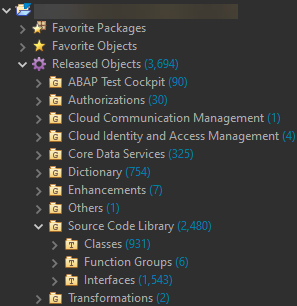
Access to SAP-provided repository objects is restricted to objects that have been released for ABAP for Cloud Development (released APIs). You can find the released repository objects in the *Project Explorer* view in ADT under *Released Objects*:
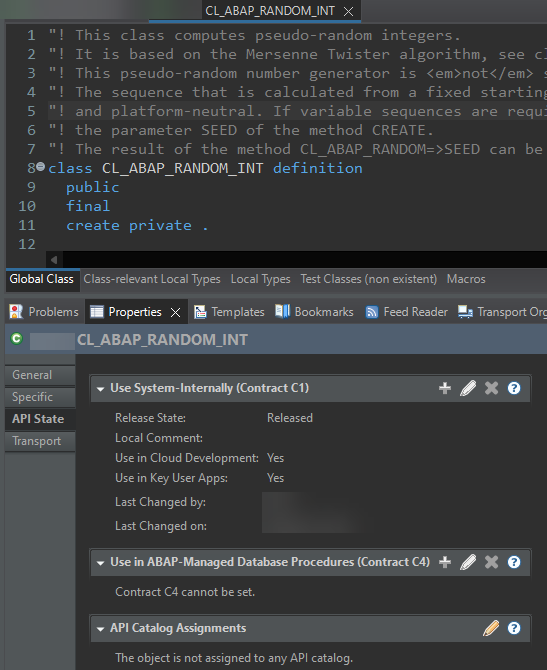
As an example of a released API, consider the `CL_ABAP_RANDOM_INT` class (computes random integers). In ADT, once you have opened the class, check the *Properties* tab. Click *API State* on the left to display information about the release contracts. In this case, it is C1. As mentioned above, see [here](https://help.sap.com/doc/abapdocu_cp_index_htm/CLOUD/en-US/index.htm?file=abenabap_versions_and_apis.htm#@@ITOC@@ABENABAP_VERSIONS_AND_APIS_2) for more information on C1, and so on. This is also true for ABAP repository objects in classic ABAP.
For deprecated and invalid syntax in ABAP for Cloud Development, refer to the following (nonsensical) example code. You can create a demo class and insert the code below (adjust the class name if necessary). Several syntax errors and warnings will be displayed:
```abap
CLASS zcl_demo_abap DEFINITION
PUBLIC
FINAL
CREATE PUBLIC .
PUBLIC SECTION.
INTERFACES if_oo_adt_classrun.
ENDCLASS.
CLASS zcl_demo_abap IMPLEMENTATION.
METHOD if_oo_adt_classrun~main.
"Example that demonstrates (not) released APIs, deprecated and
"invalid syntax in ABAP for Cloud Development
"Released DDIC data elements
DATA dobj1 TYPE timestampl.
DATA dobj2 TYPE land1.
"Attributes of the accessible type pool ABAP
DATA flag TYPE abap_boolean.
flag = abap_true.
"Released table types
DATA it1 TYPE string_table.
DATA it2 TYPE string_hashed_table.
DATA it3 TYPE xstring_table.
"Released CDS object
DATA s1 TYPE i_timezone.
"Released interface
"The if_oo_adt_classrun interface is released, and you can implement it to run an ABAP class.
"In ADT, you can do this by choosing F9. To output the content of data objects, you can use
"out->write( ... ). in the main method.
DATA ref_classrun TYPE REF TO if_oo_adt_classrun.
"Not released DDIC database table
DATA s2 TYPE scarr.
"Classes
"(Not) Released classes
DATA(ixml1) = cl_ixml_core=>create( ).
"Not released (API for classic ABAP)
DATA(ixml2) = cl_ixml=>create( ).
"Getting a random integer
DATA(random_num) = cl_abap_random_int=>create( seed = cl_abap_random=>seed( )
min = 1
max = 100 )->get_next( ).
"Released APIs from the XCO library
"Retrieving the current user date
DATA(user_date) = xco_cp=>sy->date( xco_cp_time=>time_zone->user
)->as( xco_cp_time=>format->iso_8601_extended
)->value.
"Retrieving the current user time
DATA(user_time) = xco_cp=>sy->time( xco_cp_time=>time_zone->user
)->as( xco_cp_time=>format->iso_8601_extended
)->value.
"Not released API: Querying whether the current database supports AMDP methods
DATA(amdp_allowed) = xsdbool( cl_abap_dbfeatures=>use_features(
EXPORTING requested_features = VALUE #( ( cl_abap_dbfeatures=>call_amdp_method ) ) ) ).
"ABAP SQL statements
"Selecting from a
"... not released database table
SELECT carrid, connid FROM spfli WHERE carrid = 'LH' INTO TABLE @DATA(spfli_tab).
"... released CDS view
SELECT SINGLE * FROM i_timezone WHERE TimeZoneID = 'EST' INTO @DATA(tz_info).
"... not released database table using a dynamic ABAP SQL statement
"Although the source code provides an invalid data source, the dynamic ABAP SQL statement
"does not produce a syntax error during compilation. However, it would result in a runtime
"error because you cannot select from that data source. You can check the validity of dynamic
"specifications using the `cl_abap_dyn_prg` class, which supports dynamic programming.
SELECT SINGLE carrid, connid FROM ('SPFLI') WHERE carrid = 'LH' INTO NEW @DATA(ref_spfli_tab).
"ABAP SQL Statement involving client handling; using a cheat sheet database table
"The addition `USING CLIENT` for client handling is not allowed in the restricted ABAP language scope.
DATA(clnt) = sy-mandt.
SELECT carrid, connid FROM ('ZDEMO_ABAP_FLI') USING CLIENT @clnt WHERE carrid = 'LH' INTO TABLE NEW @DATA(ref_demo_tab).
"The example includes a selection of deprecated and invalid syntax in ABAP for Cloud Development. They are added
"for demonstration purposes. For example, classic UI technology-related (such as dynpro) syntax is not allowed.
"The pointless WRITE statement within the method implementation represents invalid classic list-related statements.
"Executable programs (reports) are not allowed in the restricted ABAP language scope. To set breakpoints in ADT,
"double-click the area to the left of the code line number.
"Assignments
DATA(num1) = 1.
DATA(num2) = 1.
DATA(num3) = 2.
"Invalid statement for an assignment
MOVE num3 TO num1.
"Using the assignment operator
num2 = num3.
"Determining the number of lines in an internal table
DATA(str_table) = VALUE string_table( ( `a` ) ( `b` ) ( `c` ) ).
DATA(num_lines1) = lines( str_table ).
"Invalid statement
DESCRIBE TABLE str_table LINES DATA(num_lines2).
"Getting references
DATA: ref1 TYPE REF TO i,
ref2 TYPE REF TO i.
ref1 = REF #( num1 ).
"Deprecated statement
GET REFERENCE OF num1 INTO ref2.
"Classic ABAP-related statements and syntax
"Various sy components should not be used in ABAP for Cloud Development
DATA(current_as_abap_time) = sy-uzeit.
DATA(current_as_abap_date) = sy-datum.
DATA(current_local_time) = sy-timlo.
"Various invalid statements
DATA scarr_tab TYPE TABLE OF scarr WITH EMPTY KEY.
TRY.
cl_salv_table=>factory( IMPORTING r_salv_table = DATA(alv)
CHANGING t_table = scarr_tab ).
"The exception class is not released, too.
CATCH cx_salv_msg.
ENDTRY.
DATA code TYPE string_table.
READ REPORT 'ZCL_DEMO_ABAP_UNIT_TEST=======CCAU' INTO code.
WRITE 'hi'.
BREAK-POINT.
ENDMETHOD.
ENDCLASS.
```
2) If available to you, you have accessed a system supporting classic ABAP using ADT. It is assumed that the latest ABAP release is available.
a) Checking API status information
- Choose `CTRL + SHIFT + A` to open the search in ADT. Search the class `CL_ABAP_RANDOM_INT`. Once you have opened the class, check the *Properties* tab and find the API status information.
b) Creating an example class
- Create a global class and insert the code from above. Depending on the name of the class you created, replace the class name in the snippet.
For the example class created, check the information in the *Properties* tab. Choose *General*. The *ABAP Language Version* is maintained as *Standard ABAP*:

- If you have not imported the ABAP cheat sheet GitHub repository, remove the lines of code using artifacts from that repository, i.e. remove the statements using objects starting with `Z...`. You should not see any syntax errors. Activate the class.
- Run the class with *F9*. The code should have been processed up to the `BREAK-POINT` statement and the debugger should have started. Choose *Terminate* to exit the debugger.
- So, unlike in the case of ABAP for Cloud Development above, you should be able to activate and run the code (which does not represent a meaningful code example).
c) Verifying cloud-readiness of your code in classic ABAP
- You have walked through b), created a class, inserted the code from above, and activated the class. The *ABAP Language Version* is maintained as *Standard ABAP* in the *Properties* tab.
- Verifying if your code is cloud-ready
- You can use ATC check variant `ABAP_CLOUD_READINESS` for this purpose.
- For example, in your class, right-click and choose *Run As* → *4 ABAP Test Cockpit With...*. Enter `ABAP_CLOUD_READINESS` in the pop-up window and choose *Ok*. The ATC check run is started.
- As a result of the ATC check run (note that it may take a while to complete), the *ATC Problems* tab in ADT should display results. In this case, these are the errors and warnings mentioned above, indicating that the code is not cloud-ready in various places. Double-click on the findings for more detailed information.
d) Cloud-ready development in classic ABAP
- You have walked through b), created a class, inserted the code from above, and activated the class. The *ABAP Language Version* is maintained as *Standard ABAP* in the *Properties* tab under *General*.
- Imagine you are aiming for cloud-ready development and want to utilize ABAP for Cloud Development, the restricted version of the ABAP language, within a system that supports classic ABAP.
- Open the *Properties* tab and choose *General* for this purpose.
- Choose the *Edit...* button to the right of the *ABAP Language Version* property.
- Select *ABAP for Cloud Development* in the pop-up window and choose *Ok*.
- You will then be able to work with a repository object with the restrictions mentioned above. As a result, the example class with the code snippets will have syntax errors and cannot be activated. In more meaningful, productive development contexts, appropriate refactoring is required.
⬆️ back to top
## More Information
- Devtoberfest sessions
- [Overview of ABAP Cloud](https://www.youtube.com/watch?v=ApZSn_t_WSo)
- [ABAP Cloud for Classic ABAP Developers](https://youtu.be/jyLoSnHa0Vo)
- Blogs
- [Steampunk is going all-in](https://blogs.sap.com/2021/09/30/steampunk-is-going-all-in/)
- [Embedded Steampunk – Some more details for ABAP developers](https://blogs.sap.com/2022/09/05/embedded-steampunk-some-more-details-for-abap-developers/)
- Documentation
- [ABAP Cloud: Background Concepts and Overview](https://help.sap.com/docs/abap-cloud/abap-cloud/why-abap-cloud)
- [ABAP Cloud - Technical Use Cases and Recommended Technologies](https://www.sap.com/documents/2023/05/74fc05e6-747e-0010-bca6-c68f7e60039b.html)
- [SAP Business Technology Platform](https://help.sap.com/docs/btp/sap-business-technology-platform/sap-business-technology-platform?version=Cloud) on the SAP Help Portal
- Section [Released Components and Objects](https://help.sap.com/docs/btp/sap-business-technology-platform/released-components-and-objects?version=Cloud) including the topic [XCO Library](https://help.sap.com/docs/btp/sap-business-technology-platform/xco-library?version=Cloud)
- ABAP Keyword Documentation
- [Rules for ABAP Cloud](https://help.sap.com/doc/abapdocu_cp_index_htm/CLOUD/en-US/index.htm?file=abenabap_strict_rules.htm)
- [Language Elements in ABAP Versions](https://help.sap.com/doc/abapdocu_cp_index_htm/CLOUD/en-US/index.htm?file=abenrestricted_abap_elements.htm): A table showing which ABAP language elements are allowed in which ABAP language version
- [Contract Rules for ABAP Released APIs](https://help.sap.com/doc/abapdocu_cp_index_htm/CLOUD/en-US/index.htm?file=abenrestricted_apis.htm)
⬆️ back to top
## Executable Example
[zcl_demo_abap_cloud_excursion](./src/zcl_demo_abap_cloud_excursion.clas.abap)
> [!NOTE]
> - The executable example ...
> - does not focus - unlike other ABAP cheat sheet examples - on ABAP syntax as such (the other non-Standard-ABAP cheat sheet examples focus on ABAP syntax available in ABAP for Cloud Development), but rather emphasizes released APIs and libraries that provide predefined functionality and can be used in ABAP for Cloud Development. In particular, the Extension Components Library (XCO) is used.
> - covers an arbitrary selection for you to explore. For more detailed information and code snippets, see the SAP Help Portal documentation [here](https://help.sap.com/docs/btp/sap-business-technology-platform/sap-business-technology-platform?version=Cloud) and [here about XCO](https://help.sap.com/docs/btp/sap-business-technology-platform/xco-library?version=Cloud). In most cases, the example covers a selection of classes and methods for retrieving information about repository objects. It is more of a "playground" for exploring the APIs with a few snippets of code, and should be seen as an invitation to more in-depth exploration.
> - The steps to import and run the code are outlined [here](README.md#-getting-started-with-the-examples).
> - [Disclaimer](./README.md#%EF%B8%8F-disclaimer)