# ABAP for RAP: Entity Manipulation Language (ABAP EML)
- [ABAP for RAP: Entity Manipulation Language (ABAP EML)](#abap-for-rap-entity-manipulation-language-abap-eml)
- [RAP Terms](#rap-terms)
- [Excursion: RAP Behavior Definition (BDEF)](#excursion-rap-behavior-definition-bdef)
- [ABAP Behavior Pools (ABP)](#abap-behavior-pools-abp)
- [RAP Handler Classes and Methods](#rap-handler-classes-and-methods)
- [RAP Saver Class and Saver Methods](#rap-saver-class-and-saver-methods)
- [BDEF Derived Types](#bdef-derived-types)
- [Components of BDEF Derived Types](#components-of-bdef-derived-types)
- [EML Syntax](#eml-syntax)
- [EML Syntax for Modifying Operations](#eml-syntax-for-modifying-operations)
- [EML Syntax for Reading Operations](#eml-syntax-for-reading-operations)
- [Dynamic Forms of EML Statements](#dynamic-forms-of-eml-statements)
- [Persisting to the Database](#persisting-to-the-database)
- [EML Statements in ABAP Behavior Pools](#eml-statements-in-abap-behavior-pools)
- [RAP Excursions](#rap-excursions)
- [Using Keys and Identifying RAP BO Instances in a Nutshell](#using-keys-and-identifying-rap-bo-instances-in-a-nutshell)
- [RAP Concepts](#rap-concepts)
- [Ensuring Data Consistency in a RAP Transaction](#ensuring-data-consistency-in-a-rap-transaction)
- [More Information](#more-information)
- [Executable Examples](#executable-examples)
## RAP Terms
[ABAP Entity Manipulation Language](https://help.sap.com/doc/abapdocu_latest_index_htm/latest/en-US/index.htm?file=abenaeml_glosry.htm) (or EML for short) is a subset of ABAP that allows you to access the data of [RAP](https://help.sap.com/doc/abapdocu_latest_index_htm/latest/en-US/index.htm?file=abenarap_glosry.htm) business objects in an ABAP program.
The following points cover RAP-related terms such as *RAP business objects* and others for setting the context:
- RAP business objects (RAP BO)
- A RAP BO is based on a special, tree-like hierarchical structure
of [CDS
entities](https://help.sap.com/doc/abapdocu_cp_index_htm/CLOUD/en-US/index.htm?file=abencds_entity_glosry.htm "Glossary Entry")
of a data model
- Such a structure of entities consists of [parent
entities](https://help.sap.com/doc/abapdocu_cp_index_htm/CLOUD/en-US/index.htm?file=abenparent_entity_glosry.htm "Glossary Entry")
and [child
entities](https://help.sap.com/doc/abapdocu_cp_index_htm/CLOUD/en-US/index.htm?file=abenchild_entity_glosry.htm "Glossary Entry")
that are themselves defined using [CDS
compositions](https://help.sap.com/doc/abapdocu_cp_index_htm/CLOUD/en-US/index.htm?file=abencds_composition_glosry.htm "Glossary Entry")
and [to-parent
associations](https://help.sap.com/doc/abapdocu_cp_index_htm/CLOUD/en-US/index.htm?file=abento_parent_association_glosry.htm "Glossary Entry").
- The top parent entity of a [CDS composition
tree](https://help.sap.com/doc/abapdocu_cp_index_htm/CLOUD/en-US/index.htm?file=abencds_composition_tree_glosry.htm "Glossary Entry")
is the root entity that represents the business object. With a
large composition tree, RAP BOs can be fairly complex. Or they
can be very simple by just consisting of one root entity alone.
- Note: There is a special syntax for the [CDS root entity](https://help.sap.com/doc/abapdocu_cp_index_htm/CLOUD/en-US/index.htm?file=abenroot_entity_glosry.htm) of a RAP BO: [`define root view entity`](https://help.sap.com/doc/abapdocu_cp_index_htm/CLOUD/en-US/index.htm?file=abencds_define_root_view_v2.htm)
- [RAP behavior
definition](https://help.sap.com/doc/abapdocu_cp_index_htm/CLOUD/en-US/index.htm?file=abencds_behavior_definition_glosry.htm "Glossary Entry")
(BDEF)
- RAP BOs are described by the definitions specified in a special
[DDIC](https://help.sap.com/doc/abapdocu_cp_index_htm/CLOUD/en-US/index.htm?file=abenddic_glosry.htm "Glossary Entry")
artifact: RAP behavior definition (BDEF)
- A BDEF defines the [RAP business object
behavior](https://help.sap.com/doc/abapdocu_cp_index_htm/CLOUD/en-US/index.htm?file=abenrap_bo_behavior_glosry.htm "Glossary Entry")
(i. e. the transactional behavior of a RAP BO)
- Transactional behavior means a BDEF defines [behavior
characteristics](https://help.sap.com/doc/abapdocu_cp_index_htm/CLOUD/en-US/index.htm?file=abencds_entity_properties_glosry.htm "Glossary Entry")
and [RAP BO
operations](https://help.sap.com/doc/abapdocu_cp_index_htm/CLOUD/en-US/index.htm?file=abenrap_bo_operation_glosry.htm "Glossary Entry") i.
e. [RAP BO standard
operations](https://help.sap.com/doc/abapdocu_cp_index_htm/CLOUD/en-US/index.htm?file=abenrap_standard_operation_glosry.htm "Glossary Entry")
([CRUD
operations](https://help.sap.com/doc/abapdocu_cp_index_htm/CLOUD/en-US/index.htm?file=abencrud_glosry.htm "Glossary Entry")),
[non-standard
operations](https://help.sap.com/doc/abapdocu_cp_index_htm/CLOUD/en-US/index.htm?file=abenrap_nstandard_operation_glosry.htm "Glossary Entry")
like specific [RAP
actions](https://help.sap.com/doc/abapdocu_cp_index_htm/CLOUD/en-US/index.htm?file=abenrap_action_glosry.htm "Glossary Entry")
and
[functions](https://help.sap.com/doc/abapdocu_cp_index_htm/CLOUD/en-US/index.htm?file=abenrap_function_glosry.htm "Glossary Entry"),
and more.
- There are many other things that can be included impacting the
RAP BO behavior like [RAP feature
control](https://help.sap.com/doc/abapdocu_cp_index_htm/CLOUD/en-US/index.htm?file=abenrap_feature_control_glosry.htm "Glossary Entry"),
for example, defining which data is mandatory and which is
read-only, or
[determinations](https://help.sap.com/doc/abapdocu_cp_index_htm/CLOUD/en-US/index.htm?file=abenrap_determination_glosry.htm "Glossary Entry")
and
[validations](https://help.sap.com/doc/abapdocu_cp_index_htm/CLOUD/en-US/index.htm?file=abenrap_validation_glosry.htm "Glossary Entry").
- BDEFs use [Behavior Definition
Language](https://help.sap.com/doc/abapdocu_cp_index_htm/CLOUD/en-US/index.htm?file=abenbdl_glosry.htm "Glossary Entry")
(BDL) for the definitions. Find more information on the topic
and various options to define the transactional behavior in
section [BDL for Behavior
Definitions](https://help.sap.com/doc/abapdocu_cp_index_htm/CLOUD/en-US/index.htm?file=abenbdl.htm)
in the ABAP Keyword Documentation.
- Transactional buffer and implementation types
- A BDEF defines the behavior of a RAP BO and, thus, how to handle
its data. This data is available in the [RAP transactional
buffer](https://help.sap.com/doc/abapdocu_cp_index_htm/CLOUD/en-US/index.htm?file=abentransactional_buffer_glosry.htm "Glossary Entry").
- It is a storage for a RAP BO's data that is used and worked on
during an [SAP LUW](https://help.sap.com/doc/abapdocu_cp_index_htm/CLOUD/en-US/index.htm?file=abensap_luw_glosry.htm).
- This data includes [RAP BO
instances](https://help.sap.com/doc/abapdocu_cp_index_htm/CLOUD/en-US/index.htm?file=abenrap_bo_instance_glosry.htm "Glossary Entry")
(i. e. concrete data sets of an entity). This is where EML
enters the picture: EML is used, among others, to access this data in the transactional buffer.
- Currently, there are two kinds of RAP BOs:
[managed](https://help.sap.com/doc/abapdocu_cp_index_htm/CLOUD/en-US/index.htm?file=abenmanaged_rap_bo_glosry.htm "Glossary Entry")
and [unmanaged RAP
BOs](https://help.sap.com/doc/abapdocu_cp_index_htm/CLOUD/en-US/index.htm?file=abenunmanaged_rap_bo_glosry.htm "Glossary Entry").
- Managed and unmanaged are implementation types that are also
specified in the BDEF.
- The implementation type determines the [RAP BO
provider](https://help.sap.com/doc/abapdocu_cp_index_htm/CLOUD/en-US/index.htm?file=abenrap_bo_provider_glosry.htm "Glossary Entry"), i.
e. how the transactional buffer is provided and how the behavior
of a RAP BO is implemented.
- Managed RAP BOs:
- The managed RAP BO provider fully or partly provides the
transactional buffer and RAP BO behavior (for standard
operations only). In this case, the developers need not cater
for the transactional buffer and implement the standard
operations. This implementation is mostly relevant for
greenfield scenarios when starting from scratch.
- Example: Regarding CRUD operations in managed RAP BOs,
developers need not cater for an implementation at all. The
standard operations work out of the box. For example, in case of
an update operation, RAP BO instance data that is to be updated
is automatically read into the transactional buffer, and then
updated accordingly there. Finally, when triggering the saving,
the updated instance in the transactional buffer is
automatically saved to the database without any custom
development needed.
- The transactional buffer is provided, too. You do not need to
create the buffer yourself.
- Note: Usually, the behavior of a RAP BO requires some
additional implementations also in the context of managed RAP
BOs. For example, non-standard operations or feature controls
must be self-implemented in [ABAP behavior
pools](https://help.sap.com/doc/abapdocu_cp_index_htm/CLOUD/en-US/index.htm?file=abenbehavior_pool_glosry.htm "Glossary Entry")
(see the details further down).
- Unmanaged RAP BOs:
- Everything must be provided by the [unmanaged RAP BO
provider](https://help.sap.com/doc/abapdocu_cp_index_htm/CLOUD/en-US/index.htm?file=abenunmanaged_rap_bo_prov_glosry.htm "Glossary Entry"), i.
e. the transactional buffer and all RAP BO operations must be
provided or self-implemented by developers in an ABAP behavior
implementation
- Unmanaged RAP BOs are, for example, relevant for brownfield
scenarios, i. e. in scenarios in which transactional buffers and application logic is already
available and should be embedded in the RAP world. Note that it is possible to have a managed RAP BO with unamanged parts, e.g. unamanged save or additional save. Find more information [here](https://help.sap.com/doc/abapdocu_cp_index_htm/CLOUD/en-US/index.htm?file=abenbdl_rap_bo.htm).
- ABAP behavior implementation in an ABAP behavior pool (ABP)
- An [ABAP behavior
pool](https://help.sap.com/doc/abapdocu_cp_index_htm/CLOUD/en-US/index.htm?file=abenbehavior_pool_glosry.htm "Glossary Entry")
is a special [class
pool](https://help.sap.com/doc/abapdocu_cp_index_htm/CLOUD/en-US/index.htm?file=abenclass_pool_glosry.htm "Glossary Entry")
for an ABAP behavior implementation that implements the
unmanaged RAP BO provider based on definitions in a BDEF. The
class pool's name is specified in the BDEF.
- The [global
class](https://help.sap.com/doc/abapdocu_cp_index_htm/CLOUD/en-US/index.htm?file=abenglobal_class_glosry.htm "Glossary Entry")
of a behavior pool does not implement the behavior itself. It is
(initially) empty apart from the declaration and implementation part skeletons. The behavior implementation is coded in local
[RAP handler
classes](https://help.sap.com/doc/abapdocu_cp_index_htm/CLOUD/en-US/index.htm?file=abenabp_handler_class_glosry.htm "Glossary Entry")
and a [RAP saver
class](https://help.sap.com/doc/abapdocu_cp_index_htm/CLOUD/en-US/index.htm?file=abenabp_saver_class_glosry.htm "Glossary Entry")
in the [CCIMP
include](https://help.sap.com/doc/abapdocu_cp_index_htm/CLOUD/en-US/index.htm?file=abenccimp_glosry.htm "Glossary Entry")
of the behavior pool. These classes are called by the [RAP
runtime
engine](https://help.sap.com/doc/abapdocu_cp_index_htm/CLOUD/en-US/index.htm?file=abenrap_runtime_engine_glosry.htm "Glossary Entry")
when the RAP BO is accessed. This is covered in more detail
further down.
- Usually, saver classes are not needed in managed RAP BOs (except
for special variants of managed RAP BOs which are not covered
here). Local handler classes are, as mentioned above, usually
needed in managed RAP BOs if implementations are required that
go beyond standard operations.
- Note: In more complex scenarios, with RAP BOs that
consist of many entities, you can define behavior pools for
individual entities by adding the syntax to the [`define
behavior
for`](https://help.sap.com/doc/abapdocu_cp_index_htm/CLOUD/en-US/index.htm?file=abenbdl_define_beh.htm)
notation. There is not a saver class for each entity but only
one saver class for the BO as a whole. Any number of behavior
pools can be assigned to a BDEF allowing applications a
structuring into multiple units.
Find more terms in the [RAP Glossary](https://help.sap.com/doc/abapdocu_cp_index_htm/CLOUD/en-US/index.htm?file=abenrap_glossary.htm) of the ABAP Keyword Documentation.
There are more artifacts and concepts related to RAP that go way beyond
the scope of this cheat sheet. For example, a RAP BO can be exposed as a
[business
service](https://help.sap.com/doc/abapdocu_cp_index_htm/CLOUD/en-US/index.htm?file=abenbusiness_service_glosry.htm "Glossary Entry")
to be accessed from outside [AS
ABAP](https://help.sap.com/doc/abapdocu_latest_index_htm/latest/en-US/index.htm?file=abenas_abap_sys_environ_glosry.htm "Glossary Entry")
and consumed. A [RAP BO
consumer](https://help.sap.com/doc/abapdocu_cp_index_htm/CLOUD/en-US/index.htm?file=abenrap_bo_consumer_glosry.htm "Glossary Entry")
is either the [RAP transactional
engine](https://help.sap.com/doc/abapdocu_cp_index_htm/CLOUD/en-US/index.htm?file=abenrap_transac_engine_glosry.htm "Glossary Entry")
that handles requests from outside the AS ABAP or, from inside AS ABAP,
an ABAP program using ABAP EML (which this cheat sheet and the examples
focus on).
⬆️ back to top
## Excursion: RAP Behavior Definition (BDEF)
- As mentioned in the RAP terms and as the name implies, a RAP behavior definition describes a RAP business object (RAP BO) by defining its behavior for all of its RAP BO entities.
- BDL source code is used in a BDEF.
- Once you have created ...
- the CDS root entity of a RAP BO, ADT helps you create the skeleton of a BDEF (e.g., right-click on the CDS root entity and choose *New Behavior Definition* from the pop-up).
- the BDEF, ADT helps you create the skeleton of an ABAP behavior pool, as well as RAP handler and saver method declarations and the skeleton of implementations via ADT quick fixes.
- More information (see also the subtopics there):
- [Structure of a RAP behavior definition](https://help.sap.com/doc/abapdocu_cp_index_htm/CLOUD/en-US/index.htm?file=abencds_bdef.htm)
- [Infos about BDL syntax](https://help.sap.com/doc/abapdocu_cp_index_htm/CLOUD/en-US/index.htm?file=abenbdl_syntax.htm)
- [Infos about behavior definitions](https://help.sap.com/doc/abapdocu_cp_index_htm/CLOUD/en-US/index.htm?file=abenbdl.htm)
The following example shows a commented BDEF.
Note that there is a wide variety of possible specifications and options. The example shows only a selection. For full details, refer to the ABAP Keyword Documentation.
Some of the syntax examples are commented out, just for the sake of showing more syntax options.
```js
//Possible implementation types: managed, unmanaged, abstract, projection, interface
//(which restrict/enable further specifications)
//You can specifiy one or more implementation classes (behavior pools/ABPs -> bp...)
//for the RAP BO (in some contexts, specifying no ABP is possible).
//Specifying unique is mandatory (each operation can only implemented once).
managed implementation in class bp_some_demo unique;
//For managed RAP BOs, you can enable user-defined saving options (optional additions
//are available).
//Purpose: Enhancing or replacing the default save sequence (Note: Only in this case,
//the ABP has a local saver class/save_modified saver method)
//managed with additional save with full data implementation in class bp_some_demo unique;
//full data: Full instance data is passed for saving
//managed with unmanaged save implementation in class bp_some_demo unique;
//Enabling the strict mode (and version) to apply additional syntax checks; handled by
//the RAP framework; it is recommended that you use the most recent version
strict ( 2 );
//Enabling RAP draft handling
//with draft;
//It is mandatory to specify an entity behavior definition for the RAP BO root entity.
//Here, some_demo represents a CDS view entity.
define behavior for some_demo
//Specifying an alias name (e.g. to have a more telling name than the technical name of
//the entity). When specifying an alias name, you should address the entity with the alias
//name instead of the full name (e.g. in the signature of handler methods).
//define behavior for some_demo alias root
//Specifying the database table a RAP BO is based on (only available/mandatory in managed
//BOs); note further requirements for diverse scenarios in the documentation
persistent table some_dbtab
//Mandatory specification of a draft table when a RAP BO is draft-enabled
//draft table drafttab
//Specifying the locking mechanism for entities, e.g. to prevent a simultaneous
//modification. In unmanaged RAP BOs, this must be self-implemented in a dedicated handler
//method
lock master
//Controlling authorization that is to be implemented in an ABP (also for managed)
//You can specify variants: global (e.g. for restricting certain operations) and/or
//instance (restrictions based on entity instances) or both of them (dedicated handler
//methods must be implemented)
//More variants are available that can be specified in the { ... } block below for
//excluding and delegating authorization checks (e.g. authorization:update)
authorization master ( instance )
//authorization master ( global )
//authorization master ( instance, global )
//Defining late numbering for primary key fields (see the adjust_numbers handler method)
//More numbering options are available such as early numbering, or, in the { ... } block below,
//the 'numbering : managed' specification for particular fields.
//late numbering
//Defining a field as entity tag (ETag) field for optimistic concurrency control (i.e.
//enabling transactional access to data by multiple users to avoid inconsistencies when
//unintentionally changing already modified data). More options available, e.g. for
//draft-enabled RAP BOs (total etag).
//etag master some_field
{
//RAP BO operations
//Standard operations (Note: Read is implicitly enabled, no specification available)
create;
update;
//More additions are available dealing with authorization, feature control, precheck etc.
//The example shows precheck. In doing so, you can implement a precheck (e.g. to prevent
//unwanted changes) before instances are deleted in a dedicated handler method. A precheck
//implementation is also available for other operations (e.g. actions).
//As is true for various specifications, a comma-separated list of specifications is possible.
delete( precheck );
//Note: It is not possible to specify operations multiple times. The following specifications
//just demonstrate syntax options. Anyway, the compiler helps you not to specify wrong notations.
//Applying feature control
//delete( features: global );
//Applying authorization control
//delete( authorization : update );
//Operations for associations (many specification options are possible)
//The following example means enabling create-by-association operations for associations
//Assumption: _child is specified in the the underlying CDS data model.
association _child { create; }
//Non-standard operations (check the specification options in the documentation, e.g. feature
//control and others are possible) such as actions (modify RAP BO instance) and functions (return
//information). There are different flavors of actions such as non-factory and factory actions,
//which themselves have different variations. Other flavors of actions are save actions (only to
//be executed during save sequence), determine actions (allow RAP BO consumers to execute
//determinations and validations on request), and draft actions.
//Non-factory actions (modify existing instances)
//Instance action, relates to instances, modify instances
action act1;
//Static action, not bound to instances, relates to the entrie entity
static action act2;
//Internal action, accessible only from within the ABP (internal can also be specified in other
//contexts, e.g. operations)
internal action act3;
//You can optionally specify input or output parameters or both (not always possible for all
//action types). The following example shows an output parameter, defined with the result
//addition. It stores the result of an action in an internal table. Variants are possible for
//the return type. Here, it is $self (result type is the same type as entity) It can, for
//example, also be an abstract BDEF or a different entity.
action act4 result [1] $self;
//Input parameter specified following 'parameter' (in this case, a CDS abstract entity)
action act5 parameter some_cds_abstract;
//Factory action (to create instances, can be instance-bound or static)
//Specifying the cardinality is mandatory
factory action act6 [1];
//Draft actions
//Available for draft-enabled RAP BOs, allow data modification on the draft table; are
//implicitly available; it is recommended for the draft actions to be specified explicitly;
//for some of the methods the 'with additional implementation' is available
//Copies active instances to the draft table
//draft action Edit;
//Sets a lock for entity instances on the persistent database table
//draft action Resume;
//Copies draft table content to the persitent database table; recommendation: use the
//optimized addition
//draft action Activate optimized;
//Clears entries from the draft database table
//draft action Discard;
//Corresponds to the determine actions for active instances;
//used to validate draft data before transitioning to active data
//draft determine action Prepare
// {
//You can assign validations and determinations defined with 'on save'
// validation val;
// }
//Functions (similar to actions, there are optional additions, such as static)
//Since they return information, specifying an output parameter is required.
//Instance function
function func1 result [0..*] $self;
//Static function
static function func2 result [1] some_cds_abstract;
//Instance function with optional input parameter
function func3 parameter some_cds_abstract result [1] $self;
//Field characteristics
//Field values cannot be created/updated
field ( readonly ) field1;
//Read-only during update (especially key fields created during create operations)
field ( readonly : update ) key_field;
//The mandatory specification denotes that values must be provided for the fields before persisting
//them to the database.
//Comma-separated list possible for the field characteristics in general;
//mutliple characteristics can also be specified in a comma-separated list in the parentheses
field ( mandatory ) field2, field3;
//Defining access restrictions for fields
field ( features : instance ) field4;
//Validations
//Checking the consitency of instances; validations are triggered based on conditions
//Conditions (one or more are possible) can be specified for create, update, delete operations
//and modified fields; note: not available for unmanaged, non-draft RAP BOs.
validation val on save { create; field field1; }
//Determinations
//Modifying instances based on trigger conditions;
//As above, conditions (one or more are possible) can be specified for create, update, delete
//operations and modified fields. The triggering is possible for 'on modify' and 'on save'.
determination det1 on modify { update; delete; field field5, field6; }
determination det2 on save { create; field field7, field8; }
//RAP business event (derived events with the specification 'managed evt ...' are also possible)
event evt;
//RAP side effects, to trigger a reload of affected properties on the UI
//Trigger properties: Field changes, action executions
//Multiple side effects can be specified within a { ... } block, separated by a colon
//There are multiple options to specify the target following 'affect'; the example uses fields
//to be reloaded
side effects { field field1 affects field field4;
field field2 affects field field4;
field field3 affects field field4;
action act1 affects field field4; }
}
//It is optional to specify an entity behavior definition for child entities
define behavior for some_child_entity alias child
//Applying locks dependent on the specified association (locks are delegated to
//the specified association). In this case, it's the parent entity. Assumption:
//_parent is specified in the the underlying CDS data model.
lock dependent by _parent
//Applying authorization checks dependent on the specified association
//As above, the assumption is that _parent is specified in the underlying CDS
//data model.
authorization dependent by _parent
{
update;
delete;
field ( readonly ) key_field;
field ( readonly : update ) key_field_child;
association _parent;
}
```
⬆️ back to top
## ABAP Behavior Pools (ABP)
As mentioned above, you can access RAP BO data from inside AS ABAP using
EML. Among other things, EML allows you to read or modify RAP BOs by
accessing the RAP BO data (the RAP BO instances) in the transactional
buffer and trigger the persistent storage or reset changes. More
precisely, when EML statements are executed, the calling of [RAP handler
methods](https://help.sap.com/doc/abapdocu_cp_index_htm/CLOUD/en-US/index.htm?file=abenabp_handler_method_glosry.htm "Glossary Entry")
is triggered to access the transactional buffer of a RAP BO. As
mentioned, for unmanaged RAP BOs or unmanaged parts of managed RAP BOs,
the handler methods that are called are part of an ABAP behavior pool.
The global class of an ABP has the addition [`FOR BEHAVIOR OF bdef`](https://help.sap.com/doc/abapdocu_cp_index_htm/CLOUD/en-US/index.htm?file=abapclass_for_behavior_of.htm)
to the definition while `bdef` stands for the name of the BDEF.
This class is (initially) empty apart from the declaration and implementation part skeleton.
```abap
CLASS zbp_demo_abap_rap_draft_m DEFINITION PUBLIC ABSTRACT FINAL FOR BEHAVIOR OF zdemo_abap_rap_draft_m.
ENDCLASS.
CLASS zbp_demo_abap_rap_draft_m IMPLEMENTATION.
ENDCLASS.
```
The actual implementation is done in local classes in the CCIMP include (*Local Types* tab in ADT) of the behavior pool. There,
two kinds of local classes are to be defined and implemented that are
related to the RAP BO's runtime: one or more [handler
classes](https://help.sap.com/doc/abapdocu_cp_index_htm/CLOUD/en-US/index.htm?file=abenabp_handler_class_glosry.htm "Glossary Entry")
to implement the RAP BO behavior (in RAP handler methods) during the
[RAP interaction
phase](https://help.sap.com/doc/abapdocu_cp_index_htm/CLOUD/en-US/index.htm?file=abenrap_int_phase_glosry.htm "Glossary Entry")
(the data reading and modification phase) and a [saver
class](https://help.sap.com/doc/abapdocu_cp_index_htm/CLOUD/en-US/index.htm?file=abenabp_saver_class_glosry.htm "Glossary Entry")
to implement the [RAP save
sequence](https://help.sap.com/doc/abapdocu_cp_index_htm/CLOUD/en-US/index.htm?file=abenrap_save_seq_glosry.htm "Glossary Entry")
(in [saver
methods](https://help.sap.com/doc/abapdocu_cp_index_htm/CLOUD/en-US/index.htm?file=abenabp_saver_method_glosry.htm "Glossary Entry")
to save data from the transactional buffer to the database).
⬆️ back to top
### RAP Handler Classes and Methods
- One or more handler classes implement the RAP interaction phase. For
modularization purposes, one behavior pool can define multiple
handler classes. For example, each entity can have its own handler
class, or individual handler classes can be defined to distinguish
between reading and changing RAP BO entities.
- A handler class inherits from class
`CL_ABAP_BEHAVIOR_HANDLER`.
- These classes are implicitly `ABSTRACT` and `FINAL`
since instantiating and calling only happens through the RAP runtime
engine.
- [ADT](https://help.sap.com/doc/abapdocu_cp_index_htm/CLOUD/en-US/index.htm?file=abenadt_glosry.htm "Glossary Entry")
helps you create the classes and methods (and basically the ABP as
such) when creating the BDEF. A quick fix is available that creates
the method definitions and a skeleton of the implementations
automatically.
Example: Handler class definition
``` abap
CLASS lhc_root DEFINITION INHERITING FROM cl_abap_behavior_handler.
...
ENDCLASS.
```
- Handler method definitions include the additions `... FOR ... FOR
...` followed by the kinds of operations. There are various
options depending on the RAP BO operation.
- Depending on the definition in the BDEF, there might be more additions
with dedicated method parameters. For example, an action might
be defined with a result parameter, hence, the method must be
defined with the addition `RESULT` and a parameter.
- The `FOR MODIFY` handler method can handle multiple entities
and operations, i. e. not only create but also update or delete
might be integrated in the method definition. However, it might be
useful to split the handler method into separate methods for better
readability.
- See more details on the handler method definitions in the topic
[`METHODS, FOR`](https://help.sap.com/doc/abapdocu_cp_index_htm/CLOUD/en-US/index.htm?file=abapmethods_for_rap_behv.htm).
Example: Handler method definitions
``` abap
"Create
METHODS create FOR MODIFY
IMPORTING entities FOR CREATE bdef.
"Read: Specifying a read result is mandatory.
METHODS read FOR READ
IMPORTING keys FOR READ bdef RESULT result.
"Action: action name is preceded by the BDEF name and a tilde after FOR ACTION
METHODS some_action FOR MODIFY
IMPORTING keys FOR ACTION bdef~some_action.
```
**Parameters of Handler Methods**
- The handler method definitions contain RAP-specific additions like
`FOR MODIFY`, `FOR CREATE` or `FOR READ` as
well as mandatory or optional additions like `RESULT` that
are followed by parameters.
- Nearly all parameters are typed with [BDEF derived
types](https://help.sap.com/doc/abapdocu_cp_index_htm/CLOUD/en-US/index.htm?file=abenrap_derived_type_glosry.htm "Glossary Entry")
that have special RAP-related components as covered further down.
- The parameters' names can be chosen freely. This is also true for
the method names except for some predefined names.
- Each handler method must have at least one importing parameter. The
addition `IMPORTING` is optional since it is used
implicitly. In most cases, entire instances or just key values
of instances are imported.
- All handler methods have changing parameters that are usually not
explicitly specified in the definition but implicitly used. The
explicit specification of the `CHANGING` addition is not needed. In most cases, these are
[RAP response
parameters](https://help.sap.com/doc/abapdocu_cp_index_htm/CLOUD/en-US/index.htm?file=abenrap_response_param_glosry.htm "Glossary Entry").
The following image shows the F2 information in ADT for the create
handler method.
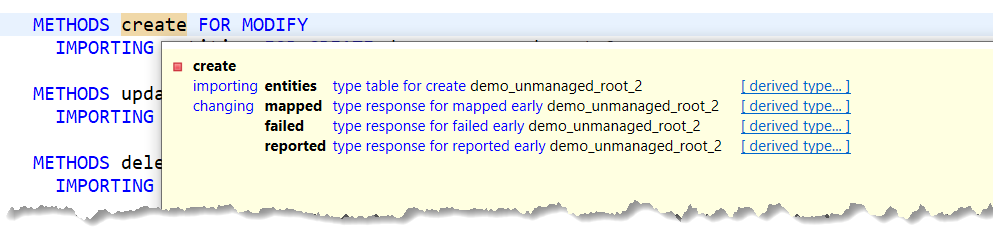
- The response parameters `mapped`, `failed` and
`reported` (the names are predefined) can be considered as
containers for information - information a RAP BO consumer is
provided with by a RAP BO provider, for example, an SAP Fiori app
displays an error message if something went wrong. The availability
of the parameters depends on the handler method used (e. g.
`mapped` is only available for operations creating
instances).
- `mapped`: Used to provide mapping information on RAP BO
instances, for example, which key values were created for given
content IDs (
[`%cid`](https://help.sap.com/doc/abapdocu_cp_index_htm/CLOUD/en-US/index.htm?file=abapderived_types_cid.htm)).
- `failed`: Information for identifying the data set for
which an error occurred in a RAP operation
- `reported`: Used, for example, to exchange error messages for each
entity defined in the BDEF and [not related to a specific
entity](https://help.sap.com/doc/abapdocu_cp_index_htm/CLOUD/en-US/index.htm?file=abapderived_types_other.htm).
- Example: Technically, the `reported` parameter is a
[deep
structure](https://help.sap.com/doc/abapdocu_cp_index_htm/CLOUD/en-US/index.htm?file=abendeep_structure_glosry.htm "Glossary Entry")
containing, for example, the messages of the root entity and
child entities. For example, if a create operation fails for a
RAP BO instance of the root entity, a message, information about
the instance key and other things can be included in this
parameter which is passed to a RAP BO consumer. You could
imagine that such an error message is displayed on an SAP Fiori
UI if something goes wrong to inform the user.
⬆️ back to top
### RAP Saver Class and Saver Methods
- A RAP saver class implements the [RAP save
sequence](https://help.sap.com/doc/abapdocu_cp_index_htm/CLOUD/en-US/index.htm?file=abenrap_save_seq_glosry.htm "Glossary Entry").
A saver class is usually only available in unmanaged RAP BOs (except
for special variants of managed RAP BOs that are not outlined here).
- The saver class is implicitly `ABSTRACT` and `FINAL`
since the instantiating and calling only happens through the RAP
runtime engine.
- A saver class can be defined in the CCIMP include of an ABAP
behavior pool. It includes the definitions and implementations of
RAP saver methods.
- The saver methods consist of a set of predefined methods having
predefined names. Some of them are mandatory to implement, some are
optional. The
[`adjust_numbers`](https://help.sap.com/doc/abapdocu_cp_index_htm/CLOUD/en-US/index.htm?file=abensaver_adjust_numbers.htm)
method is only available in [late
numbering](https://help.sap.com/doc/abapdocu_cp_index_htm/CLOUD/en-US/index.htm?file=abenrap_late_numbering_glosry.htm "Glossary Entry")
scenarios.
- A saver class inherits from class
`CL_ABAP_BEHAVIOR_SAVER`. The saver methods are
declared by redefining predefined methods of the superclass. They
implicitly have response parameters.
- In contrast to RAP handler methods, saver methods do not have data
of RAP BO instances as import parameter. Therefore, instance data
must be handled via the transactional buffer when self-implementing
the saver methods.
- Saver methods are called when the RAP save sequence has been triggered by a [`COMMIT
ENTITIES`](https://help.sap.com/doc/abapdocu_cp_index_htm/CLOUD/en-US/index.htm?file=abapcommit_entities.htm)
statement. Note that in natively supported RAP scenarios, for example, an SAP Fiori app using OData, the `COMMIT ENTITIES` call is performed implicitly and automatically by the [RAP runtime engine](https://help.sap.com/doc/abapdocu_cp_index_htm/CLOUD/en-US/index.htm?file=abenrap_runtime_engine_glosry.htm).
- Find more information on RAP saver methods
[here](https://help.sap.com/doc/abapdocu_cp_index_htm/CLOUD/en-US/index.htm?file=abenabp_saver_class.htm).
Example: Definition of a RAP saver class and saver methods
``` abap
CLASS lsc_bdef DEFINITION INHERITING FROM cl_abap_behavior_saver.
PROTECTED SECTION.
"For final calculations and data modifications involving all
"BOs in the current RAP transaction
METHODS finalize REDEFINITION.
"Checks the consistency of the transactional buffer before
"the save method saves data to the database
METHODS check_before_save REDEFINITION.
"Preliminary IDs are mapped to final keys. Only for late numbering.
METHODS adjust_numbers REDEFINITION.
"Saves the current state of the transactional buffer to the database
METHODS save REDEFINITION.
"Clear the transactional buffer
METHODS cleanup REDEFINITION.
METHODS cleanup_finalize REDEFINITION.
ENDCLASS.
```
⬆️ back to top
## BDEF Derived Types
The operands of EML statements and parameters of handler and saver
methods are mainly special messenger tables for passing data and
receiving results or messages, i. e. the communication between a RAP BO
consumer and the RAP BO provider using EML consists (in most cases) of
exchanging data stored in internal tables that have special ABAP types -
[BDEF derived
types](https://help.sap.com/doc/abapdocu_cp_index_htm/CLOUD/en-US/index.htm?file=abenrap_derived_type_glosry.htm "Glossary Entry").
These types are tailor-made for RAP purposes.
As the name implies, the types are derived by the [ABAP runtime
framework](https://help.sap.com/doc/abapdocu_cp_index_htm/CLOUD/en-US/index.htm?file=abenabap_runtime_frmwk_glosry.htm "Glossary Entry")
from CDS entities and their behavior definition in the BDEF. With these
special types, a type-safe access to RAP BOs is guaranteed.
You can create internal tables (using [`TYPE TABLE
FOR`](https://help.sap.com/doc/abapdocu_cp_index_htm/CLOUD/en-US/index.htm?file=abaptype_table_for.htm)),
structures (using [`TYPE STRUCTURE
FOR`](https://help.sap.com/doc/abapdocu_cp_index_htm/CLOUD/en-US/index.htm?file=abaptype_structure_for.htm))
and data types with BDEF derived types. For all operations and behavior
characteristics defined in the BDEF, types can be derived.
The syntax uses - similar to the method definitions mentioned before -
the addition `FOR` followed by the operation and the name of an
entity (and, if need be, the concrete name, e. g. in case of an action
defined in the BDEF).
Each BDEF derived type can be categorized as
[input](https://help.sap.com/doc/abapdocu_cp_index_htm/CLOUD/en-US/index.htm?file=abenrap_input_der_type_glosry.htm "Glossary Entry")
or [output derived
type](https://help.sap.com/doc/abapdocu_cp_index_htm/CLOUD/en-US/index.htm?file=abenrap_output_der_type_glosry.htm "Glossary Entry")
according to its use as importing or exporting parameters in methods of
RAP BO providers. In most cases, structures of type `TYPE STRUCTURE
FOR` can be considered as serving as [work
area](https://help.sap.com/doc/abapdocu_cp_index_htm/CLOUD/en-US/index.htm?file=abenwork_area_glosry.htm "Glossary Entry")
and line type of the internal tables. However, there are also structured
derived types that do serve as types for handler method parameters.
The response parameters `mapped`, `failed` and
`reported` have dedicated derived types: [`TYPE RESPONSE
FOR`](https://help.sap.com/doc/abapdocu_cp_index_htm/CLOUD/en-US/index.htm?file=abaptype_response_for.htm).
They are deep structures containing the information for the individual
entities of the RAP BO. The components of these structures are internal
tables of appropriate types with `TYPE TABLE FOR`.
Examples for BDEF derived types:
``` abap
"Data objects with input derived types (entity = name of a root entity)
"For an EML create operation
DATA create_tab TYPE TABLE FOR CREATE entity.
"For an update operation
DATA update_tab TYPE TABLE FOR UPDATE entity.
"Type for create-by-association operations specifying the name of the entity
"and the association
DATA cba_tab TYPE TABLE FOR CREATE entity\_child.
"For an action execution; the name of the action is preceded by a tilde
DATA action_imp TYPE TABLE FOR ACTION IMPORT entity~action1.
"Data objects with output derived types
"For a read operation
DATA read_tab TYPE TABLE FOR READ RESULT entity.
"For an action defined with a result
DATA action_res TYPE TABLE FOR ACTION RESULT entity~action2.
"Examples for structures and types
DATA create_wa TYPE STRUCTURE FOR CREATE entity.
"For permission retrieval
DATA perm_req TYPE STRUCTURE FOR PERMISSIONS REQUEST entity.
"For retrieving global features
DATA feat_req TYPE STRUCTURE FOR GLOBAL FEATURES RESULT entity.
"Type declaration using a BDEF derived type
TYPES der_typ TYPE TABLE FOR DELETE entity.
"Response parameters
DATA map TYPE RESPONSE FOR MAPPED entity.
DATA fail TYPE RESPONSE FOR FAILED entity.
DATA rep TYPE RESPONSE FOR REPORTED entity.
```
> **💡 Note**
> Some of the derived types can only be created and accessed in implementation classes.
⬆️ back to top
### Components of BDEF Derived Types
Many of the BDEF derived types contain components of CDS entities like
key and data fields that retain their original line type, for example, a
messenger table typed with `TYPE TABLE FOR CREATE`. Certainly,
if an instance is to be created, key and field values of a RAP BO
instance are of relevance.
Yet, all BDEF derived types contain special RAP components serving a
dedicated purpose. The names of these RAP components begin with
`%` to avoid naming conflicts with components of the CDS
entities. The following image shows the F2 information of a BDEF derived
type containing the `%` components and fields from the CDS
entity.
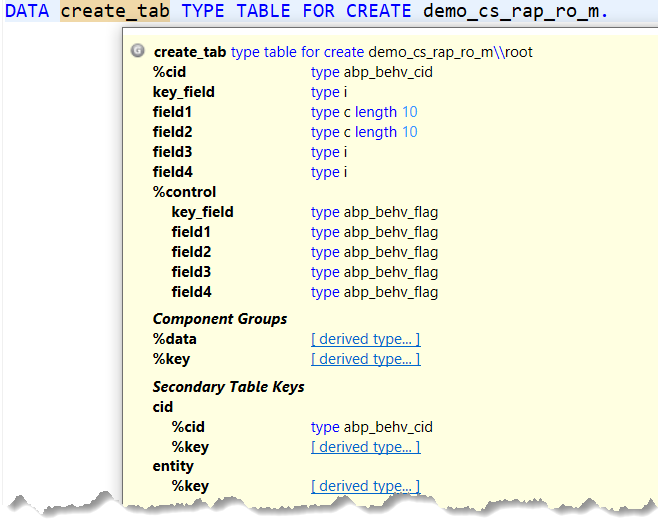
Some of the `%` components are [component
groups](https://help.sap.com/doc/abapdocu_cp_index_htm/CLOUD/en-US/index.htm?file=abencomponent_group_glosry.htm "Glossary Entry")
summarizing groups of table columns under a single name. In doing so,
they simplify the handling of derived types for developers. For example,
the component group
[`%data`](https://help.sap.com/doc/abapdocu_cp_index_htm/CLOUD/en-US/index.htm?file=abapderived_types_data.htm)
contains all primary key and data fields of a RAP BO entity (actually,
by containing the keys, it also contains the component group
[`%key`](https://help.sap.com/doc/abapdocu_cp_index_htm/CLOUD/en-US/index.htm?file=abapderived_types_key.htm)
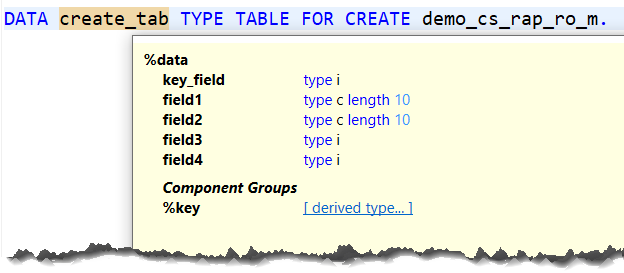
in the case above). The F2 information in ADT helps you find out about
the available components in a variable. The image below shows the
details of `%data` when clicking the *derived type*
link in the first ADT F2 information screen.
The availability of `%` components depends on definitions in the
BDEF. Their availability also depends on more criteria, for example, the
scenario. For example, the component
[`%pid`](https://help.sap.com/doc/abapdocu_cp_index_htm/CLOUD/en-US/index.htm?file=abapderived_types_pid.htm)
that represents a preliminary ID for a RAP BO instance is only available
in [late
numbering](https://help.sap.com/doc/abapdocu_cp_index_htm/CLOUD/en-US/index.htm?file=abenrap_late_numbering_glosry.htm "Glossary Entry")
scenarios. The draft indicator
[`%is_draft`](https://help.sap.com/doc/abapdocu_cp_index_htm/CLOUD/en-US/index.htm?file=abapderived_types_is_draft.htm)
is only relevant in the context of
[draft](https://help.sap.com/doc/abapdocu_cp_index_htm/CLOUD/en-US/index.htm?file=abenbdl_with_draft.htm).
Find more details on the available components in section [Components of
BDEF Derived
Types](https://help.sap.com/doc/abapdocu_cp_index_htm/CLOUD/en-US/index.htm?file=abapderived_types_comp.htm).
Bullet points on selected `%` components:
- [`%cid`](https://help.sap.com/doc/abapdocu_cp_index_htm/CLOUD/en-US/index.htm?file=abapderived_types_cid.htm)
- A string to define a content ID.
- Content IDs are used as a unique and preliminary identifier for
RAP BO operations in which instances are created and especially
in cases where the key values of RAP BO instances are not yet
determined
- Assume that you create a RAP BO instance with an EML create
request and the key value has not yet been determined. In the
same request - a save has not yet been triggered - an update is
requested for this RAP BO instance. Using the content ID, it is
guaranteed that the update operation happens for the desired
instance. For this purpose, derived types for operations like
update or delete include the component
[`%cid_ref`](https://help.sap.com/doc/abapdocu_cp_index_htm/CLOUD/en-US/index.htm?file=abapderived_types_cid_ref.htm)
to refer to the content ID `%cid` as the name implies.
- Note: You should always fill `%cid` even if not
needed. The specified content ID is only valid within one ABAP
EML request. You can use the optional addition [`AUTO FILL CID`](https://help.sap.com/doc/abapdocu_cp_index_htm/CLOUD/en-US/index.htm?file=abapmodify_entity_entities_fields.htm#!ABAP_ONE_ADD@1@) in EML modify operations to create `%cid` automatically. However, if you use this addition, you cannot refer to `%cid` in subsequent operations.
- [`%key`](https://help.sap.com/doc/abapdocu_cp_index_htm/CLOUD/en-US/index.htm?file=abapderived_types_key.htm)/[`%tky`](https://help.sap.com/doc/abapdocu_cp_index_htm/CLOUD/en-US/index.htm?file=abapderived_types_tky.htm)
- Both are component groups summarizing all primary keys of a RAP
BO instance.
- Where possible, it is recommended that you use `%tky`
instead of `%key`. `%tky` includes
`%key` and also the draft indicator
`%is_draft`. When using `%tky` in non-draft
scenarios, you are prepared for a potential, later switch to a
draft scenario. In doing so, you can avoid lots of adaptations
in your code by manually adding the indicator.
- [`%control`](https://help.sap.com/doc/abapdocu_cp_index_htm/CLOUD/en-US/index.htm?file=abapderived_types_control.htm)
- Component group that contains the names of all key
and data fields of a RAP BO instance which indicate flags.
- For example, it is used to get information on which fields are provided or set a
flag for which fields are requested by RAP BO providers or RAP
BO consumers respectively during the current EML request.
- For this purpose, the value of each field in the
`%control` structure is of type
`ABP_BEHV_FLAG`. For the value setting,
you can use the structured constant `mk` of interface
`IF_ABAP_BEHV`. Note that the technical
type is `x length 1`.
- Example: If you want to read data from a RAP BO instance and
particular non-key fields in `%control` are set to
`if_abap_behv=>mk-off`, the values of these fields
are not returned in the result.
⬆️ back to top
## EML Syntax
The focus is here on selected EML statements. These statements can be
fairly long and various additions are possible. Find more information on
the EML statements
[here](https://help.sap.com/doc/abapdocu_cp_index_htm/CLOUD/en-US/index.htm?file=abeneml.htm).
### EML Syntax for Modifying Operations
The modifying operations covered include the standard operations (using
the additions
[`CREATE`](https://help.sap.com/doc/abapdocu_cp_index_htm/CLOUD/en-US/index.htm?file=abapmodify_entity_entities_op.htm),
[`CREATE
BY`](https://help.sap.com/doc/abapdocu_cp_index_htm/CLOUD/en-US/index.htm?file=abapmodify_entity_entities_op.htm),
[`UPDATE`](https://help.sap.com/doc/abapdocu_cp_index_htm/CLOUD/en-US/index.htm?file=abapmodify_entity_entities_op.htm),
and
[`DELETE`](https://help.sap.com/doc/abapdocu_cp_index_htm/CLOUD/en-US/index.htm?file=abapmodify_entity_entities_op.htm))
and non-standard operations (actions) using the addition
[`EXECUTE`](https://help.sap.com/doc/abapdocu_cp_index_htm/CLOUD/en-US/index.htm?file=abapmodify_entity_entities_op.htm).
All EML statements for the mentioned operations begin with
[`MODIFY`](https://help.sap.com/doc/abapdocu_cp_index_htm/CLOUD/en-US/index.htm?file=abapmodify_entity_entities.htm).
The following commented code snippets demonstrate the
[short](https://help.sap.com/doc/abapdocu_cp_index_htm/CLOUD/en-US/index.htm?file=abapmodify_entity_short.htm)
and [long
form](https://help.sap.com/doc/abapdocu_cp_index_htm/CLOUD/en-US/index.htm?file=abapmodify_entities_long.htm)
of EML `MODIFY` statements.
> **💡 Note**
> Unlike reading operations, modifying operations are not enabled by default. You must make the respective notations in the BDEF:
> ```
> ...
> create;
> update;
> delete;
> action some_act;
> ...
> ```
Create operation for creating new instances of a RAP BO entity:
``` abap
"Declaration of data objects using BDEF derived types
DATA: cr_tab TYPE TABLE FOR CREATE root_ent, "input derived type
mapped_resp TYPE RESPONSE FOR MAPPED root_ent, "response parameters
failed_resp TYPE RESPONSE FOR FAILED root_ent,
reported_resp TYPE RESPONSE FOR REPORTED root_ent.
"Input derived type for the EML statement is filled using the VALUE operator
"Assumption: key_field is the key field having type i,
"field1 and field2 are data fields with character-like data type.
"Specify %cid even if not used or of interest; it must be unique within a request
cr_tab = VALUE #(
( %cid = 'cid1' key_field = 1
field1 = 'A' field2 = 'B' )
( %cid = 'cid2'
"Just to demo %data/%key. You can specify fields with or without
"the derived type components
%data = VALUE #( %key-key_field = 2
field1 = 'C'
field2 = 'D' ) ) ).
"EML statement, short form
"root_ent must be the full name of the root entity, it is basically the name of the BDEF
MODIFY ENTITY root_ent
CREATE "determines the kind of operation
FIELDS ( key_field field1 field2 ) WITH cr_tab "Fields to be respected for the
"input derived type and the input
"derived type itself
MAPPED mapped_resp "mapping information
FAILED failed_resp "information on failures with instances
REPORTED reported_resp. "messages
```
> **💡 Note**
> - Addition [`FIELDS ( ... ) WITH`](https://help.sap.com/doc/abapdocu_cp_index_htm/CLOUD/en-US/index.htm?file=abapmodify_entity_entities_fields.htm):
This field selection option specifies which fields are to be
respected for the operation. The derived type, i. e. an internal
table containing the concrete RAP BO instance values, follows
`WITH`. If a field is specified in the field list within the
pair of parentheses after `FIELDS`, the `%control`
flag for this field is automatically set to
`if_abap_behv=>mk-on`. Likewise, if a field is not
contained in the list, the flag in `%control` is set to
`if_abap_behv=>mk-off`. Assume `field2` is not
specified in the list. The value for `field2` will not be
respected (even if a value is specified in the internal table). The
initial value will be used for the field.
>- Retrieving the responses and specifying the parameters is optional.
Assuming a data set with the value 2 for `key_field`
already exists on the database for this BO, you should expect an
entry for this particular instance in the `failed_resp`
operand and potentially an error message in
`reported_resp`, too. Nevertheless, especially in ABP
implementations and depending on the context, you should implement
and fill these parameters according to the [RAP BO
contract](https://help.sap.com/doc/abapdocu_cp_index_htm/CLOUD/en-US/index.htm?file=abenrap_bo_contract_glosry.htm "Glossary Entry")
to meet the variety of implementation rules.
>- `%cid` should be provided even if you are not interested in
it and subsequent operations do not require the reference.
Long form of an EML `MODIFY` statement:
``` abap
MODIFY ENTITIES OF root_ent "full name of root entity
ENTITY root "root or child entity (alias name if available)
CREATE FROM "FROM as further field selection variant
VALUE #( ( %cid = 'cid' "Input derived type created inline
key_field = 3
field1 = 'E'
field2 = 'F'
%control = VALUE #( "Must be filled when using FROM
key_field = if_abap_behv=>mk-on
field1 = if_abap_behv=>mk-on
field2 = if_abap_behv=>mk-on ) ) )
MAPPED DATA(m) "Target variables declared inline
FAILED DATA(f)
REPORTED DATA(r).
```
> **💡 Note**
>- The entity specified after `ENTITY` can be either the root
entity itself or a child entity. If an alias is defined, the alias
should be used.
>- The addition `FIELDS ( ... ) WITH` from the previous
snippet is basically a shortcut for the addition
[`FROM`](https://help.sap.com/doc/abapdocu_cp_index_htm/CLOUD/en-US/index.htm?file=abapmodify_entity_entities_fields.htm)
that is used here. When using `FROM`, the values of the
`%control` structure must be specified explicitly.
>- The BDEF derived types can also be created
[inline](https://help.sap.com/doc/abapdocu_cp_index_htm/CLOUD/en-US/index.htm?file=abendata_inline.htm)
as shown in the example using a [constructor
expression](https://help.sap.com/doc/abapdocu_cp_index_htm/CLOUD/en-US/index.htm?file=abenconstructor_expression_glosry.htm "Glossary Entry")
for the input derived type and with `DATA` or
[`FINAL`](https://help.sap.com/doc/abapdocu_cp_index_htm/CLOUD/en-US/index.htm?file=abenfinal_inline.htm)
for the responses.
>- The long form allows you to bundle several operations in one
statement, either different operations on the same entity (for
example, deleting some instances and updating some others) or
operations on different entities of the same RAP BO (for example,
creating a root entity instance and related instances of a child
entity in one EML request). Long and short forms are also available
for other EML statements.
>- The [`SET FIELDS WITH`](https://help.sap.com/doc/abapdocu_latest_index_htm/latest/en-US/index.htm?file=abapmodify_entity_entities_fields.htm#!ABAP_VARIANT_4@4@) addition is available as another field specification option. However, it has limitations that you should be aware of. It can cause syntax warnings. Check the documentation. It is recommended that you use `FIELDS ... WITH` and `FROM`.
Excursion: Specifying `%control` component values in the short form of `VALUE` constructor expressions
```abap
"The following EML statement creates RAP BO instances. The BDEF derived
"type is created inline. With the FROM addition, the %control values
"must be specified explicitly. You can provide the corresponding values
"for all table lines using the short form, i.e. outiside of the inner
"parentheses, instead of individually specifying the values for each
"instance within the parentheses. In this case, the corresponding %control
"component value is assigned for all of the following table lines.
MODIFY ENTITIES OF zdemo_abap_rap_ro_m
ENTITY root
CREATE FROM VALUE #(
%control-key_field = if_abap_behv=>mk-on
%control-field1 = if_abap_behv=>mk-on
%control-field2 = if_abap_behv=>mk-on
%control-field3 = if_abap_behv=>mk-on
%control-field4 = if_abap_behv=>mk-off
( %cid = 'cid1'
key_field = 1
field1 = 'aaa'
field2 = 'bbb'
field3 = 10
field4 = 100 )
( %cid = 'cid2'
key_field = 2
field1 = 'ccc'
field2 = 'ddd'
field3 = 20
field4 = 200 ) )
MAPPED DATA(m)
FAILED DATA(f)
REPORTED DATA(r).
```
The following EML statement combines multiple operations in one EML
request. It demonstrates the use of `%cid` and
`%cid_ref`. First, two instances are created by specifying
`%cid`. An update operation in the same request only specifies a
certain field within the parentheses of the `FIELDS ( ... )
WITH` addition which denotes that only this particular field
should be updated. The other field values remain unchanged. The
reference to the instance is made via `%cid_ref`. Consider an
EML request in which no instance to refer to using `%cid_ref`
exists, e. g. for an update operation. You can also make the reference
using the unique key. A delete operation is available in the same
request, too. `DELETE` can only be followed by the addition
`FROM`. In contrast to other derived types, the derived type
that is expected here (`TYPE TABLE FOR DELETE`) only has
`%cid_ref` and the key as components.
``` abap
MODIFY ENTITIES OF root_ent
ENTITY root
CREATE FIELDS ( key_field field1 field2 ) WITH
VALUE #( ( %cid = 'cid4' key_field = 4
field1 = 'G' field2 = 'H' )
( %cid = 'cid5' key_field = 5
field1 = 'I' field2 = 'J' ) )
UPDATE FIELDS ( field2 ) WITH
VALUE #( ( %cid_ref = 'cid4' field2 = 'Z' ) )
DELETE FROM
VALUE #( ( %cid_ref = 'cid5' ) "Instance referenced via %cid_ref
( key_field = 9 ) ) "Instance referenced via the key
...
```
EML statement including the execution of an action:
``` abap
MODIFY ENTITIES OF root_ent
ENTITY root
EXECUTE some_action
FROM action_tab
RESULT DATA(action_result) "Assumption: The action is defined with a result parameter.
...
```
The following code snippet shows a deep create. First, an instance is
created for the root entity. Then, in the same request, instances are
created for the child entity based on the root instance. In the example
below, the assumption is that a composition is specified in the root
view entity like `composition [1..*] of root_ent as _child` and `key_field` and
`key_field_child` are the keys of the child view entity. The
[`%target`](https://help.sap.com/doc/abapdocu_cp_index_htm/CLOUD/en-US/index.htm?file=abapderived_types_target.htm)
component group enters the picture here which contains the target's
primary key and data fields.
``` abap
MODIFY ENTITIES OF root_ent
ENTITY root_ent
CREATE FIELDS ( key_field field1 field2 ) WITH
VALUE #( ( %cid = 'cid6' key_field = 6
field1 = 'I' field2 = 'J' ) )
CREATE BY \_child
FIELDS ( key_field_child field1_child field2_child ) WITH
VALUE #( ( %cid_ref = 'cid6'
%target = VALUE #( ( %cid = 'cid_child_1'
key_field_child = 1
field1_child = 'aa'
field2_child = 'bb' )
( %cid = 'cid_child_2'
key_field_child = 2
field1_child = 'cc'
field2_child = 'dd' ) ) ) )
...
```
⬆️ back to top
### EML Syntax for Reading Operations
- Read-only operations always return a result, i.e. the syntax of the
EML statement requires the addition `RESULT` and an operand.
- When RAP BO instances are read, the returned data include the
current status of instances in the transactional buffer which
includes unsaved modifications on instances. If an instance is not
yet available in the transactional buffer, the currently persisted
data set is automatically read into the transactional buffer.
- Note that read operations are always implicitly enabled for each
entity listed in a BDEF, i. e. there is no extra definition in the
BDEF in contrast to, for example, create or update.
The following code snippet shows the long form of the EML
[`READ`](https://help.sap.com/doc/abapdocu_cp_index_htm/CLOUD/en-US/index.htm?file=abapread_entity_entities_op.htm)
statement for reading instances from the root entity. In `READ`
statements, the additions `FIELDS ( ... ) WITH` and
`FROM` can also be used to specify the fields that you intend to
read. Here, the addition [`ALL FIELDS
WITH`](https://help.sap.com/doc/abapdocu_cp_index_htm/CLOUD/en-US/index.htm?file=abapread_entity_entities_fields.htm)
is available for reading all field values.
``` abap
READ ENTITIES OF root_ent
ENTITY root_ent
ALL FIELDS WITH
VALUE #( ( key_field = 1 ) "Derived type TYPE TABLE FOR READ IMPORT only includes the keys
( key_field = 2 ) )
RESULT DATA(result)
FAILED DATA(f)
REPORTED DATA(r).
```
Read-by-association operations include the optional addition
[`LINK`](https://help.sap.com/doc/abapdocu_cp_index_htm/CLOUD/en-US/index.htm?file=abapread_entity_entities_op&sap-language=EN&sap-client=000&version=X&anchor=!ABAP_ONE_ADD@1@&tree=X)
with which you can retrieve the keys of the source and target (i. e. the
associated entity). The by-association operations work reciprocally, i.
e. you can, for example, read a child instance via the parent and a
parent instance via the child, too.
``` abap
"Read-by association operation: parent to child
READ ENTITIES OF root_ent
ENTITY root_ent
BY \_child
ALL FIELDS WITH VALUE #( ( key_field = 1 ) )
RESULT DATA(rba_res1)
LINK DATA(links1).
...
"Read-by association operation: child to parent
READ ENTITIES OF root_ent
ENTITY child_ent
BY \_parent
ALL FIELDS WITH VALUE #( ( key_field = 1 key_field_child = 1 ) )
RESULT DATA(rba_res2)
LINK DATA(links2).
...
```
⬆️ back to top
#### Dynamic Forms of EML Statements
In addition to the short and long forms described above, various ABAP EML statements also have dynamic forms.
Taking EML read operations as an example, the following code snippet shows a dynamic EML [`READ ENTITIES`](https://help.sap.com/doc/abapdocu_cp_index_htm/CLOUD/en-US/index.htm?file=abapread_entities_operations.htm) statement. The relevant syntax element is the `OPERATIONS` addition.
The dynamic form allows the collection of read operations for multiple RAP BOs in one EML statement.
For more information, see the ABAP keyword documentation and the comments in the snippet.
```abap
"The statement is taken from the executable example. The example has a
"root entity and a child entity. For both entities, RAP BO instances
"are to be read (read and read-by-association operation).
DATA:
"The following data object is the operand of the dynamic EML statement
"It is an internal table and has a special, RAP-specific type.
op_tab TYPE abp_behv_retrievals_tab,
"More data object declarations (internal tables typed with BDEF
"derived types) that are relevant for the EML statement.
"For both entities (root and child), RAP BO instances are to be
"read. The internal tables are used for components of the internal
"table op_tab further down.
read_dyn TYPE TABLE FOR READ IMPORT zdemo_abap_rap_ro_m,
read_dyn_result TYPE TABLE FOR READ RESULT zdemo_abap_rap_ro_m,
rba_dyn TYPE TABLE FOR READ IMPORT zdemo_abap_rap_ro_m\_child,
rba_dyn_result TYPE TABLE FOR READ RESULT zdemo_abap_rap_ro_m\_child,
rba_dyn_link TYPE TABLE FOR READ LINK zdemo_abap_rap_ro_m\_child.
"Filling the internal tables, i.e. which instances are to be read
"Root entity
"Example:
"- The key is comprised of the field 'key_field'. It is of type i.
"- The %control structure is filled, flagging those fields that
" are to be read. Flagging the key field is not required.
read_dyn = VALUE #(
( %key-key_field = 1
%control = VALUE #(
field1 = if_abap_behv=>mk-on
field2 = if_abap_behv=>mk-on
field3 = if_abap_behv=>mk-on
field4 = if_abap_behv=>mk-on ) )
( %key-key_field = 2
%control = VALUE #(
field1 = if_abap_behv=>mk-on
field2 = if_abap_behv=>mk-on
field3 = if_abap_behv=>mk-on
field4 = if_abap_behv=>mk-on ) ) ).
"Child entity
"Instances to be read for a read-by-association operation
"The shared key is 'key_field'.
rba_dyn = VALUE #(
( %key-key_field = 1
%control = VALUE #(
key_ch = if_abap_behv=>mk-on
field_ch1 = if_abap_behv=>mk-on
field_ch2 = if_abap_behv=>mk-on ) )
( %key-key_field = 2
%control = VALUE #(
key_ch = if_abap_behv=>mk-on
field_ch1 = if_abap_behv=>mk-on
field_ch2 = if_abap_behv=>mk-on ) ) ).
"Filling the internal table that is the operand of the
"dynamic EML statement
"This table has optional and mandatory components.
op_tab = VALUE #(
( "op: Specifies the operation to be executed; is mandatory;
" can be set with the predefined constants, e.g. OP-R-READ
" etc., of interface IF_ABAP_BEHV
op = if_abap_behv=>op-r-read
"entity_name: Specifies the name of the RAP BO entity for which
" the operation is executed; is mandatory
entity_name = 'ZDEMO_ABAP_RAP_RO_M'
"instances: Specifies a reference to an internal table holding
" the input keys; must be appropriately typed; is mandatory
instances = REF #( read_dyn )
"results: Specifies a reference to an internal table with the required
" BDEF derived type for the read results; is mandatory
results = REF #( read_dyn_result ) )
( op = if_abap_behv=>op-r-read_ba
entity_name = 'ZDEMO_ABAP_RAP_RO_M'
"sub_name: Only relevant for specifying association names in
" read-by-association operations; in that context, it is mandatory
sub_name = '_CHILD'
"full: Optional flag; specifies if all target instances are to be retrieved
full = abap_true
instances = REF #( rba_dyn )
results = REF #( rba_dyn_result )
"links: Reference to internal table holding the key pairs of the source and
" target
links = REF #( rba_dyn_link ) ) ).
READ ENTITIES OPERATIONS op_tab.
```
⬆️ back to top
### Persisting to the Database
- A [`COMMIT
ENTITIES`](https://help.sap.com/doc/abapdocu_cp_index_htm/CLOUD/en-US/index.htm?file=abapcommit_entities.htm)
statement triggers the RAP save sequence. Without such a statement,
the modified RAP BO instances that are available in the
transactional buffer are not persisted to the database. As mentioned above, in case of a natively supported RAP
scenario (for example, when using OData), the `COMMIT
ENTITIES` request is executed automatically.
- `COMMIT ENTITIES` implicitly includes [`COMMIT
WORK`](https://help.sap.com/doc/abapdocu_cp_index_htm/CLOUD/en-US/index.htm?file=abapcommit.htm).
- Note: `COMMIT ENTITIES` statements cannot be used
in behavior implementations.
- There are multiple variants available for the statement as described
in the ABAP Keyword Documentation
[here](https://help.sap.com/doc/abapdocu_cp_index_htm/CLOUD/en-US/index.htm?file=abapcommit_entities.htm). For example, RAP responses can be retrieved, key conversion in late numbering scenarios, checking a RAP transaction in a simulation mode.
- `COMMIT ENTITIES` statements set the system field
`sy-subrc`. When using `COMMIT ENTITIES`, it is not
guaranteed that `COMMIT WORK` is carried out successfully.
Hence, you should include a check for `sy-subrc` after
`COMMIT ENTITIES` so that you can react to failures
accordingly.
The following snippet shows a create operation. This operation has only
an impact on the database with the `COMMIT ENTITIES` statement.
Triggering the save sequence means that the execution of the statement
triggers the calling of the saver methods available in the saver class
of a behavior implementation. In managed scenarios (except for some
special variants), the saving is done automatically without implementing
a dedicated saver method.
``` abap
MODIFY ENTITIES OF root_ent
ENTITY root_ent
CREATE FIELDS ( key_field field1 field2 ) WITH
VALUE #( ( %cid = 'cid' key_field = 7
field1 = 'K' field2 = 'L' ) ).
COMMIT ENTITIES.
IF sy-subrc <> 0.
...
ENDIF.
```
⬆️ back to top
### EML Statements in ABAP Behavior Pools
- There are a [special additions when using EML in behavior
pools](https://help.sap.com/doc/abapdocu_cp_index_htm/CLOUD/en-US/index.htm?file=abeneml_in_abp.htm).
One of them is [`IN LOCAL MODE`](https://help.sap.com/doc/abapdocu_cp_index_htm/CLOUD/en-US/index.htm?file=abapin_local_mode.htm).
- This addition can be used to exclude feature controls and
authorization checks.
- Consider the following use case: There is a field to display the
booking status of a trip on a UI. In the BDEF, this field is
specified as read-only. Hence, it cannot be modified by a user on
the UI. However, there is a button on the UI to book the trip. This
button might trigger an action to book the trip so that the value of
the field changes from open to booked. To enable this, the
underlying handler method for the modify operation with the action
to be executed has the addition `IN LOCAL MODE` that ignores
the feature control.
Syntax:
``` abap
MODIFY ENTITIES OF root_ent IN LOCAL MODE
ENTITY root
EXECUTE book
FROM action_tab
...
```
⬆️ back to top
## RAP Excursions
### Using Keys and Identifying RAP BO Instances in a Nutshell
Expand to view the details
The following bullet points outline important aspects regarding
keys and identifying [RAP BO
instances](https://help.sap.com/doc/abapdocu_cp_index_htm/CLOUD/en-US/index.htm?file=abenrap_bo_instance_glosry.htm "Glossary Entry") in ABAP EML statements.
**Why is it important?**
- The [primary
key](https://help.sap.com/doc/abapdocu_cp_index_htm/CLOUD/en-US/index.htm?file=abenprimary_key_glosry.htm "Glossary Entry")
of a [RAP BO entity instance](https://help.sap.com/doc/abapdocu_cp_index_htm/CLOUD/en-US/index.htm?file=abenrap_bo_entity_inst_glosry.htm "Glossary Entry")
is composed of one or more [key fields](https://help.sap.com/doc/abapdocu_cp_index_htm/CLOUD/en-US/index.htm?file=abenkey_field_glosry.htm "Glossary Entry").
- These key fields stand for the fields that are specified with
`key` in the underlying [CDS view entity](https://help.sap.com/doc/abapdocu_cp_index_htm/CLOUD/en-US/index.htm?file=abencds_v2_view_glosry.htm "Glossary Entry")
of the RAP BO.
- The primary key uniquely identifies each RAP BO entity instance.
- After the creation of an instance including the primary key during a [RAP create operation](https://help.sap.com/doc/abapdocu_cp_index_htm/CLOUD/en-US/index.htm?file=abenrap_create_operation_glosry.htm "Glossary Entry"),
the primary key can no longer be changed.
- Note that there are different numbering concepts, such as [early](https://help.sap.com/doc/abapdocu_cp_index_htm/CLOUD/en-US/index.htm?file=abenrap_early_numbering_glosry.htm) and [late numbering](https://help.sap.com/doc/abapdocu_cp_index_htm/CLOUD/en-US/index.htm?file=abenlate_numbering_glosry.htm "Glossary Entry"). In the latter concept, newly created entity instances are given their final key only shortly before saving in the database. Until then, the business logic uses a temporary key that has to be replaced.
- If a data set with a particular primary key already exists in the
persistent database table, the saving of a RAP BO instance is rejected because of a duplicate primary key.
**How can a RAP BO instance be uniquely identified?**
- It can be done by using a [RAP instance identifier](https://help.sap.com/doc/abapdocu_cp_index_htm/CLOUD/en-US/index.htm?file=abenrap_inst_identifier_glosry.htm "Glossary Entry")
or [RAP content identifier](https://help.sap.com/doc/abapdocu_cp_index_htm/CLOUD/en-US/index.htm?file=abenrap_cont_identifier_glosry.htm "Glossary Entry")
or both of them.
- RAP instance identifier:
- It consists of the primary key fields and all relevant [BDEF derived type](https://help.sap.com/doc/abapdocu_cp_index_htm/CLOUD/en-US/index.htm?file=abenrap_derived_type_glosry.htm "Glossary Entry")
components.
- To ease the reference to all of these components, special
[component groups](https://help.sap.com/doc/abapdocu_cp_index_htm/CLOUD/en-US/index.htm?file=abencomponent_group_glosry.htm "Glossary Entry")
are available to summarize the components and make them
addressable via one single name.
- [`%key`](https://help.sap.com/doc/abapdocu_cp_index_htm/CLOUD/en-US/index.htm?file=abapderived_types_key.htm):
Contains the primary key fields of a RAP BO instance
- [`%tky`](https://help.sap.com/doc/abapdocu_cp_index_htm/CLOUD/en-US/index.htm?file=abapderived_types_tky.htm):
Specifies the transactional key. Comprises `%key` (and,
thus, the primary key fields of a RAP BO instance) and more
components that are relevant to uniquely identify a RAP BO
instance. Among them,
[`%pid`](https://help.sap.com/doc/abapdocu_cp_index_htm/CLOUD/en-US/index.htm?file=abapderived_types_pid.htm)
(relevant for late numbering scenarios) and the draft indicator
[`%is_draft`](https://help.sap.com/doc/abapdocu_cp_index_htm/CLOUD/en-US/index.htm?file=abapderived_types_is_draft.htm)
(relevant for
[draft](https://help.sap.com/doc/abapdocu_cp_index_htm/CLOUD/en-US/index.htm?file=abenbdl_with_draft.htm)
scenarios). In non-late numbering or non-draft scenarios, these
extra components are just blank. However, it is recommended that
you use `%tky` in all scenarios since it simplifies a
possible later switch, for example, to a draft scenario. In
doing so, lots of adaptations to the code regarding the keys and
the inclusion of `%is_draft` can be avoided.
- RAP content identifier:
- Reflected in the component
[`%cid`](https://help.sap.com/doc/abapdocu_cp_index_htm/CLOUD/en-US/index.htm?file=abapderived_types_cid.htm)
which is a string of type
`ABP_BEHV_CID` to define a content ID.
- Used as a unique and preliminary identifier for RAP BO instances
in RAP create operations, especially where no primary key exists
for the particular instance.
- For newly created instances, the ID can then be used for performing further modifications, referencing to those instances using [`%cid_ref`](https://help.sap.com/doc/abapdocu_cp_index_htm/CLOUD/en-US/index.htm?file=abapderived_types_cid_ref.htm) (which has the same value as %cid), for example, in RAP operations using [`CREATE BY`](https://help.sap.com/doc/abapdocu_cp_index_htm/CLOUD/en-US/index.htm?file=abapmodify_entity_entities_op.htm), [`UPDATE`](https://help.sap.com/doc/abapdocu_cp_index_htm/CLOUD/en-US/index.htm?file=abapmodify_entity_entities_op.htm)
and
[`DELETE`](https://help.sap.com/doc/abapdocu_cp_index_htm/CLOUD/en-US/index.htm?file=abapmodify_entity_entities_op.htm),
as well as
[actions](https://help.sap.com/doc/abapdocu_cp_index_htm/CLOUD/en-US/index.htm?file=abenbdl_action.htm)
with
[`EXECUTE`](https://help.sap.com/doc/abapdocu_cp_index_htm/CLOUD/en-US/index.htm?file=abapmodify_entity_entities_op.htm)).
- In contrast to the primary key and the preliminary ID
`%pid` for late numbering scenarios, `%cid` (and
`%cid_ref`) are only available on a short-term basis
for the current ABAP EML request within the [RAP interaction phase](https://help.sap.com/doc/abapdocu_cp_index_htm/CLOUD/en-US/index.htm?file=abenrap_int_phase_glosry.htm "Glossary Entry") in one RAP transaction.
- **Note:** Specify `%cid` even if there are no further operations referring to it.
- Special case: Late numbering
- As mentioned above, in late numbering scenarios newly created
entity instances are given their final key only shortly before
saving in the database, i. e. you deal with preliminary keys in
the RAP interaction phase and the early phase of the [RAP save sequence](https://help.sap.com/doc/abapdocu_cp_index_htm/CLOUD/en-US/index.htm?file=abenrap_save_seq_glosry.htm "Glossary Entry").
- In this case, you can use `%key` to hold the preliminary
keys or use a preliminary ID in the dedicated component
[`%pid`](https://help.sap.com/doc/abapdocu_cp_index_htm/CLOUD/en-US/index.htm?file=abapderived_types_pid.htm)
which is of type `ABP_BEHV_PID` and
only available in late numbering scenarios.
- Similar to above, to uniquely identify RAP BO instances in late
numbering scenarios, you can use either `%key` or
`%pid` or both of them. In any case, the use of
`%tky` is handy because it includes both components. You
must ensure that `%tky` in total uniquely identifies the
instances.
- **Note:** A further component group to refer to the keys is available: [`%pky`](https://help.sap.com/doc/abapdocu_cp_index_htm/CLOUD/en-US/index.htm?file=abapderived_types_pky.htm). `%pky` contains `%pid` and `%key` in late numbering scenarios. In non-late numbering scenarios, it just contains `%key`. `%pky` itself is contained in `%tky`. There are contexts, for example, particular actions, where `%tky` is not available but `%pky` is. This way, there is still the option to summarize `%pid` and `%key` in one component group in the absence of `%tky`.
**General rule**: A RAP BO instance must - where available - always be uniquely
identifiable by its transactional key (`%tky`) for internal
processing during the RAP interaction phase. `%tky` always
contains all relevant components for the chosen scenario.
> **💡 Note**
> Assignment of Key Component Groups
>
> As a general best practice, you should use a RAP BO instance key component group when referring to the entire key, rather than listing the individual key fields. It is recommended that you use `%tky` whenever possible.
> In the following cases, type compatibility cannot be guaranteed in component group assignments:
> - Mixing key component groups when they refer to the same RAP BO entity, e.g. `wa-%tky = wa-%key`. Such an assignment should also be avoided when both component groups have an identical scope in terms of components (e.g. `%tky` and `%key` in non-late-numbering and non-draft scenarios).
> - Mixing the same key component groups when referring to two different RAP BO entities, for example, `wa_root-%tky = wa_child-%tky`. In this case, adding more components later may cause syntax errors for an assignment that worked previously.
> - Defining structured types that have the same components as key component groups, and then assigning data objects of that type to those of the respective, original key component group.
> In the above cases, the `CORRESPONDING` operator can be used to ensure type compatibility in assignments to key component groups:
> ```abap
>... %tky = CORRESPONDING #( wa-%tky ) ...
>... %key = CORRESPONDING #( wa-%key ) ...
>... %pky = CORRESPONDING #( wa-%pky ) ...
>```
> In cases where different data objects of key component groups of a BDEF derived type are to be assigned to the same key component group of the same entity, a direct assignment works without a syntax warning because the content is identical. A direct assignment is recommended (`...wa1_root-%tky = wa2_root-%tky ...`). The use of the `CORRESPONDING` operator is unnecessary and less performant. This is true, for example, for key component group assignments in the context of RAP response parameters failed and reported.
### RAP Concepts
Expand to view the details
**RAP numbering**
- A concept that deals with setting values for primary key fields.
- There are multiple options to handle the numbering for primary key
fields depending on when (early in the RAP interaction phase or late
in the RAP save sequence) and by whom (RAP BO consumer, behavior
pool, or framework) the primary key values are set.
- When:
- [Early numbering](https://help.sap.com/doc/abapdocu_cp_index_htm/CLOUD/en-US/index.htm?file=abenrap_early_numbering_glosry.htm "Glossary Entry"):
The final key values are assigned during a RAP create operation
in the interaction phase.
- [Late numbering](https://help.sap.com/doc/abapdocu_cp_index_htm/CLOUD/en-US/index.htm?file=abenrap_late_numbering_glosry.htm "Glossary Entry"):
The final key values are assigned during the RAP save sequence
(and here only in the RAP saver method
[`adjust_numbers`](https://help.sap.com/doc/abapdocu_cp_index_htm/CLOUD/en-US/index.htm?file=abensaver_adjust_numbers.htm)).
- By whom
- [External numbering](https://help.sap.com/doc/abapdocu_cp_index_htm/CLOUD/en-US/index.htm?file=abenrap_ext_numbering_glosry.htm "Glossary Entry"):
Key values are provided by the RAP BO consumer. For example, in
a create operation, the key values are specified by the RAP BO
consumer like other non-key field values. Basically, this is the
concept with which the snippets above are tailored.
- [Internal numbering](https://help.sap.com/doc/abapdocu_cp_index_htm/CLOUD/en-US/index.htm?file=abenrap_int_numbering_glosry.htm "Glossary Entry"):
Key values are provided by the RAP BO provider. For example, in
a create operation, the key values are not specified in an EML
create request by the RAP BO consumer but rather by the RAP BO
provider. In case of a managed RAP BO, the key is automatically
created by the framework which only works if the key is of a
certain type (16-character byte-like
[UUID](https://help.sap.com/doc/abapdocu_cp_index_htm/CLOUD/en-US/index.htm?file=abenuuid_glosry.htm "Glossary Entry")).
In case of an unmanaged RAP BO, the key values are provided in a
dedicated handler method which must be self-implemented. Note
that late numbering is internal by default since no further RAP
BO consumer interaction is possible in the late phase of the RAP
save sequence.
**Draft**
- The draft concept in RAP allows the content of the transactional
buffer to be stored in intermediate storages ([draft tables](https://help.sap.com/doc/abapdocu_cp_index_htm/CLOUD/en-US/index.htm?file=abendraft_table_glosry.htm "Glossary Entry"))
in order to allow transactions to expand over different ABAP
sessions.
- Like the concepts mentioned above, a RAP BO can be draft-enabled in
the BDEF. If enabled, the application allows data modifications and the temporary storage of modifications but does not yet persist them to the database. The users of the application can continue modifying this data later and they might even use a different device from the one where they modified the data previously.
- The draft indicator `%is_draft` is available for RAP BO instance identification. It is used to indicate if a RAP BO
instance is a [draft instance](https://help.sap.com/doc/abapdocu_cp_index_htm/CLOUD/en-US/index.htm?file=abenrap_draft_instance_glosry.htm "Glossary Entry")
or an [active instance](https://help.sap.com/doc/abapdocu_cp_index_htm/CLOUD/en-US/index.htm?file=abenrap_active_instance_glosry.htm "Glossary Entry").
Conveniently, the component group `%tky` contains
`%is_draft`. `%is_draft` can then be addressed via
`%tky`.
> **💡 Note**
> Late numbering and identification in the late phase of the RAP save sequence
>- Context: RAP saver method
> [`adjust_numbers`](https://help.sap.com/doc/abapdocu_cp_index_htm/CLOUD/en-US/index.htm?file=abensaver_adjust_numbers.htm)
> in which the final key values are assigned; the preliminary keys can
> be included in `%key` or `%pid` or both of them.
>- `%pid` and the preliminary key values in `%key` are
> automatically assigned to the following component groups when
> reaching the `adjust_numbers` method:
> - [`%tmp`](https://help.sap.com/doc/abapdocu_cp_index_htm/CLOUD/en-US/index.htm?file=abapderived_types_tmp.htm):
> A component group that is assigned the preliminary key values
> contained in `%key`. In doing so, `%tmp` takes
> over the role that `%key` has had in the RAP interaction
> phase to hold the preliminary key values.
> - `%pid` remains as is. The component group
> [`%pre`](https://help.sap.com/doc/abapdocu_cp_index_htm/CLOUD/en-US/index.htm?file=abapderived_types_pre.htm)
> contains `%pid` and `%tmp` and, thus, all
> preliminary identifiers.
>- In the `adjust_numbers` method, the preliminary keys are
> transformed into the final keys, i. e. the preliminary keys are
> mapped to `%key` (which holds the final keys in this
> context) in the `mapped` [response parameter](https://help.sap.com/doc/abapdocu_cp_index_htm/CLOUD/en-US/index.htm?file=abenrap_response_param_glosry.htm "Glossary Entry").
>- Depending on your use case to use either `%pid` or (the
> preliminary key values in) `%key` (which is `%tmp`
> here in this method) during the interaction phase or both of them,
> you must ensure that `%pre` in total (since it contains both
> `%pid` and `%tmp`) is unique and mapped to the final
> keys that are to be contained in `%key`.
### Ensuring Data Consistency in a RAP Transaction
Expand to view the details
The [LUW](https://help.sap.com/doc/abapdocu_cp_index_htm/CLOUD/en-US/index.htm?file=abenluw_glosry.htm) concept, which deals with the transfer of data from one consistent state to another, applies to applications using RAP. RAP transactions are integrated with the [SAP LUW](https://help.sap.com/doc/abapdocu_cp_index_htm/CLOUD/en-US/index.htm?file=abensap_luw_glosry.htm), which is a prerequisite for transactional consistency. RAP provides a standardized approach and rules ([RAP BO contract](https://help.sap.com/doc/abapdocu_cp_index_htm/CLOUD/en-US/index.htm?file=abenrap_bo_contract_glosry.htm)) for the [RAP business object (BO)](https://help.sap.com/doc/abapdocu_cp_index_htm/CLOUD/en-US/index.htm?file=abenrap_bo_glosry.htm) runtime to ensure that the RAP transaction is correctly implemented, data inconsistencies are avoided, and the SAP LUW is successfully completed.
**Phases of a RAP Transaction**
A RAP transaction is divided into two phases during the runtime of a RAP BO, while the second phase can be divided into two subphases that serve different purposes.
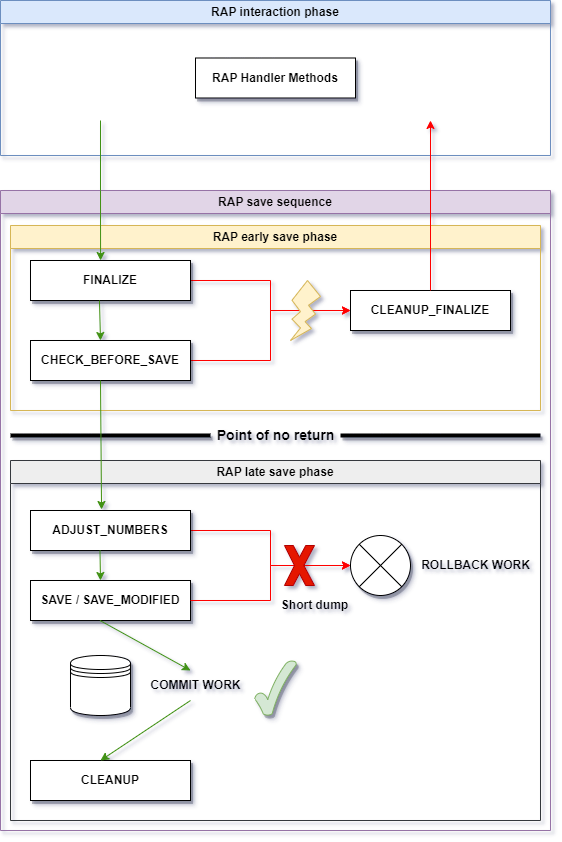
[RAP interaction phase](https://help.sap.com/doc/abapdocu_cp_index_htm/CLOUD/en-US/index.htm?file=abenrap_int_phase_glosry.htm):
- [RAP handler methods](https://help.sap.com/doc/abapdocu_cp_index_htm/CLOUD/en-US/index.htm?file=abenabp_handler_method_glosry.htm) are called in a [RAP handler class](https://help.sap.com/doc/abapdocu_cp_index_htm/CLOUD/en-US/index.htm?file=abenabp_handler_class_glosry.htm) that inherits from `CL_ABAP_BEHAVIOR_HANDLER`.
- New data, i.e. RAP BO instances, are created in the [RAP transactional buffer](https://help.sap.com/doc/abapdocu_cp_index_htm/CLOUD/en-US/index.htm?file=abentransactional_buffer_glosry.htm), or persisted data is retrieved and inserted into the transactional buffer for further processing.
- The state of the data may become inconsistent in the transactional buffer during this phase. However, the data remains consistent in the database because changes are made only in the transactional buffer.
[RAP save sequence](https://help.sap.com/doc/abapdocu_cp_index_htm/CLOUD/en-US/index.htm?file=abenrap_save_seq_glosry.htm):
- The RAP save sequence is triggered by a `COMMIT ENTITIES` statement. In natively supported RAP scenarios, such as an SAP Fiori application using OData, the `COMMIT ENTITIES` call is implicitly and automatically performed by the RAP runtime engine.
- RAP saver methods are called in the RAP saver class, which inherits from the base class `CL_ABAP_BEHAVIOR_SAVER`.
- Is divided into the [RAP early save phase](https://help.sap.com/doc/abapdocu_cp_index_htm/CLOUD/en-US/index.htm?file=abenearly_rap_save_phase_glosry.htm) (ensures that the RAP BO instances in the transactional buffer - all RAP BOs in the current RAP transaction are involved - are in a consistent state so that they can be saved to the database) and the [RAP late save phase](https://help.sap.com/doc/abapdocu_cp_index_htm/CLOUD/en-US/index.htm?file=abenlate_rap_save_phase_glosry.htm) (to finally save data from the transactional buffer to the database).
(Optional:) Saver methods called in the RAP early save phase:
1. [`finalize`](https://help.sap.com/doc/abapdocu_cp_index_htm/CLOUD/en-US/index.htm?file=abensaver_finalize.htm): For final calculations and data changes before saving. In managed scenarios, determinations specified with `ON SAVE` are called when reaching this method.
2. [`check_before_save`](https://help.sap.com/doc/abapdocu_cp_index_htm/CLOUD/en-US/index.htm?file=abensaver_check_before_save.htm): For data consistency checks in the transactional buffer. In managed scenarios, validations specified with `ON SAVE` are called when this method is reached.
3. [`cleanup_finalize`](https://help.sap.com/doc/abapdocu_cp_index_htm/CLOUD/en-US/index.htm?file=abapsaver_class_cleanup_finalize.htm): If there are failures in at least one of the previous saver methods, further processing with the RAP late save phase is rejected and the transaction returns to the interaction phase. Before that, this saver method is called, allowing changes made in the finalize method to be rolled back.
If there are errors in the early save phase, `sy-subrc` returns the value 4 after `COMMIT ENTITIES` statements. If the data in the transactional buffer is consistent after the early save phase, the late save phase is processed, which also means that a point of no return has been reached. Unlike the early save phase, you cannot return to the interaction phase when you reach the late save phase. Either the RAP transaction ends with a successful commit, or the changes are rolled back and a runtime error occurs.
Saver methods called in the RAP late save phase:
1. [`adjust_numbers`](https://help.sap.com/doc/abapdocu_cp_index_htm/CLOUD/en-US/index.htm?file=abensaver_adjust_numbers.htm): Provides RAP BO instances with their final numbers. This method is available only in late numbering scenarios.
2. [`save`](https://help.sap.com/doc/abapdocu_cp_index_htm/CLOUD/en-US/index.htm?file=abensaver_method_save.htm) (or [`save_modified`](https://help.sap.com/doc/abapdocu_cp_index_htm/CLOUD/en-US/index.htm?file=abaprap_saver_meth_save_modified.htm) in managed scenarios with an unmanaged or additional save): Used to save data from the transactional buffer to the database. If there are no issues, the final database commit is triggered and an implicit `COMMIT WORK` is executed.
[`cleanup`](https://help.sap.com/doc/abapdocu_cp_index_htm/CLOUD/en-US/index.htm?file=abensaver_method_cleanup.htm) method: After a successful save, the [`cleanup`](https://help.sap.com/doc/abapdocu_cp_index_htm/CLOUD/en-US/index.htm?file=abensaver_method_cleanup.htm) method clears the transactional buffer. It completes the save sequence.
**Commit and Rollback in a RAP Transaction**
The default ABAP statements for RAP are `COMMIT ENTITIES` (triggers the RAP save sequence and the final database commit; as mentioned above, in natively supported RAP scenarios, the commit is performed implicitly and automatically by the RAP runtime engine) and `ROLLBACK ENTITIES` (rolls back all changes of the current RAP transaction, i.e. the transactional buffer is cleared by calling the `cleanup` method). Both are RAP-specific and end the RAP transaction.
*Notes on `COMMIT ...` and `ROLLBACK ...` statements due to the integration of RAP transactions into the SAP LUW:*
- `COMMIT ENTITIES` implicitly triggers `COMMIT WORK`.
- Using `COMMIT WORK` in RAP (instead of `COMMIT ENTITIES`) also triggers the RAP save sequence. If there are no errors in the RAP save sequence, the final database commit is successful. Only in this best-case scenario does `COMMIT WORK` have the same effect as `COMMIT ENTITIES`. However, if there are errors in the save sequence, a runtime error occurs in any case, while a return to the interaction phase is still possible when using `COMMIT ENTITIES`.
- `COMMIT ENTITIES` provides RAP-specific functionality with various additions that are not possible with `COMMIT WORK`, such as RAP responses can be retrieved, key conversion in late numbering scenarios, checking a RAP transaction in a simulation mode.
- There are short, long, and dynamic forms of `COMMIT ENTITIES` statements.
- `COMMIT ENTITIES` statements implicitly enforce local updates with `COMMIT WORK`, or `COMMIT WORK AND WAIT` if the local update fails. Therefore, the update is either a local update or a synchronous update, but never an asynchronous update. When `COMMIT WORK` is used, the RAP BO consumer can choose between synchronous and asynchronous update for RAP BO entities.
- `ROLLBACK ENTITIES` implicitly triggers `ROLLBACK WORK`. Both have the same effect when used in RAP. Therefore, they are interchangeable.
> **💡 Note**
> Special Case: Failures in the Late Save Phase
> - In exceptional cases, for example, when [BAPIs](https://help.sap.com/doc/abapdocu_latest_index_htm/latest/en-US/index.htm?file=abenbapi_glosry.htm) are called to save RAP BO instances in the late save phase, it may happen that the basic rule that failures must not occur in the RAP late save phase and be detected in the RAP early save phase is violated.
> - In such cases, the base class `CL_ABAP_BEHAVIOR_SAVER_FAILED` can be used for the RAP saver class.
> - RAP BO consumers can be informed by filling the RAP response parameters (some of which are not available when using `CL_ABAP_BEHAVIOR_SAVER` as the base class) in the saver method implementation so that they can react accordingly.
> - After a `COMMIT ENTITIES` statement and a failure in the late save phase, `sy-subrc` is set to 8.
> - A subsequent RAP operation may result in a runtime error. If the RAP BO consumer is to continue after an error in the late phase of the RAP save sequence, an explicit `ROLLBACK ENTITIES` is required.
**Allowed/Forbidden Operations in a Behavior Implementation in a RAP Transaction**
The following restrictions apply to operations and/or statements in the individual phases of a RAP transaction in ABAP behavior implementations. Note that, depending on setting the strict mode in the BDEF, runtime errors may occur due to the use of forbidden statements, or static code checks may be applied. Note that most operations/statements refer to the use in the unrestricted ABAP language scope.
|Operations/Statements|Interaction phase|Early save phase|Late save phase|Notes|
|---|---|---|---|---|
|[Database commits](https://help.sap.com/doc/abapdocu_cp_index_htm/CLOUD/en-US/index.htm?file=abendatabase_commit_glosry.htm) using [secondary connections](https://help.sap.com/doc/abapdocu_cp_index_htm/CLOUD/en-US/index.htm?file=abensecondary_db_connection_glosry.htm)
(unrestricted ABAP language scope)| X| X| X |Secondary connections are allowed for infrastructure purposes, for example. They can be used to store data that is not part of the main transaction, such as application logs, traces, or number ranges. |
|Database commits using the [standard connection](https://help.sap.com/doc/abapdocu_cp_index_htm/CLOUD/en-US/index.htm?file=abenstandard_db_connection_glosry.htm)
(unrestricted ABAP language scope)| X| X| -| Database commits can be made in phases other than the late phase, for example, by calling external services or using a `WAIT` statement.|
|[sRFC](https://help.sap.com/doc/abapdocu_latest_index_htm/latest/en-US/index.htm?file=abensrfc_glosry.htm) (`CALL FUNCTION ... DESTINATION`), [aRFC](https://help.sap.com/doc/abapdocu_latest_index_htm/latest/en-US/index.htm?file=abenarfc_glosry.htm) (`CALL FUNCTION ... STARTING NEW TASK`)
(unrestricted ABAP language scope)| X |X |-| Allowed in phases other than the late save phase, e.g. for the purpose of parallelization within the application. It is up to the application to ensure consistency, e.g. to ensure read-only access, to handle a potential two-phase commit, or to provide a proper error handling. |
|Database modifications |- |-| X| Only allowed in the late save phase because the data being processed is always potentially inconsistent. Database changes in other phases would result in multiple database transactions instead of one transaction, which would disrupt the SAP LUW. |
|[Update function module](https://help.sap.com/doc/abapdocu_latest_index_htm/latest/en-US/index.htm?file=abenupdate_function_module_glosry.htm) (`CALL FUNCTION ... IN UPDATE TASK`)
(unrestricted ABAP language scope)|-| -| X |Can be used to ensure that there is only one database transaction. In addition, registering function modules for update tasks at stages other than the late save phase would interfere with RAP draft scenarios, for example, where data is stored in draft tables. There is no way to unregister function modules once they have been registered. |
|[bgRFC](https://help.sap.com/doc/abapdocu_latest_index_htm/latest/en-US/index.htm?file=abenbgrfc_glosry.htm) (`CALL FUNCTION ... IN BACKGROUND UNIT`)
(unrestricted ABAP language scope)| -| -| X| |
|[tRFC](https://help.sap.com/doc/abapdocu_latest_index_htm/latest/en-US/index.htm?file=abentrfc_2_glosry.htm), [qRFC](https://help.sap.com/doc/abapdocu_latest_index_htm/latest/en-US/index.htm?file=abenqrfc_glosry.htm) (`CALL FUNCTION ... IN BACKGROUND TASK`)
(unrestricted ABAP language scope)| -| -| - |Obsolete technologies. |
|`PERFORM ON COMMIT`, `PERFORM ON ROLLBACK`
(unrestricted ABAP language scope)|(X) |(X) |X |Basically possible in all phases, but should be reserved for the late save. Note: The use of these statements indicates improper integration with RAP. It is especially important to check draft scenarios when calling legacy code and using these statements. Instead, ABAP EML or procedure calls that do not include a `COMMIT WORK` should be used. |
|Transaction control `COMMIT WORK`, `ROLLBACK WORK` |X/-| X/-| X/- |When a transactional phase has been explicitly set by methods of the `CL_ABAP_TX` class (find more information [here](https://help.sap.com/docs/abap-cloud/abap-concepts/controlled-sap-luw)), the transaction owner is allowed to execute a commit or rollback statement. In the contexts of RAP (that is, where RAP is the transaction owner, for example, in handler and saver methods), local consumption of [RAP business events](https://help.sap.com/doc/abapdocu_cp_index_htm/CLOUD/en-US/index.htm?file=abenrap_entity_event_glosry.htm), [bgPF](https://help.sap.com/doc/abapdocu_cp_index_htm/CLOUD/en-US/index.htm?file=abenbgpf_glosry.htm), and [classified APIs](https://help.sap.com/doc/abapdocu_cp_index_htm/CLOUD/en-US/index.htm?file=abenclassified_api_glosry.htm), commit or rollback statements are not allowed. |
|[Dynpro](https://help.sap.com/doc/abapdocu_latest_index_htm/latest/en-US/index.htm?file=abendynpro_glosry.htm) processing (e.g. `SET SCREEN`, `CALL SCREEN`, `LEAVE SCREEN`, `CALL DIALOG`, `SUPPRESS DIALOG`, `MESSAGE` without `INTO`, `WRITE`, `STOP`)
(unrestricted ABAP language scope)|- |- |- |Not allowed in ABAP behavior implementations. Results in a runtime error. |
|Transaction processing (`CALL TRANSACTION`, `LEAVE TRANSACTION`)
(unrestricted ABAP language scope)| -| -| - |Not allowed to prevent (unwanted) integration of other LUWs. |
|Raising an exception (`RAISE EXCEPTION`) |-| -| - |It is not allowed to leave a RAP transaction this way. |
|Report processing (`SUBMIT ...`)
(unrestricted ABAP language scope)|- |- |- |Not allowed in transactional contexts. Results in a syntax or runtime error.
`SUBMIT ... AND RETURN` does not currently return an error, but it leads to potentially unwanted screen processing, and because of the missing return channel, there is no proper error handling. |
⬆️ back to top
## More Information
- Section [ABAP for RAP Business
Objects](https://help.sap.com/doc/abapdocu_cp_index_htm/CLOUD/en-US/index.htm?file=abenabap_for_rap_bos.htm)
in the ABAP Keyword Documentation including EML
- [RAP Glossary](https://help.sap.com/doc/abapdocu_cp_index_htm/CLOUD/en-US/index.htm?file=abenrap_glossary.htm)
- [Development guide for the ABAP RESTful Application Programming
Model](https://help.sap.com/docs/ABAP_PLATFORM_NEW/fc4c71aa50014fd1b43721701471913d/289477a81eec4d4e84c0302fb6835035.html)
- [RAP
Contract](https://help.sap.com/docs/ABAP_PLATFORM_NEW/fc4c71aa50014fd1b43721701471913d/3a402c5cf6a74bc1a1de080b2a7c6978.html):
Rules for the RAP BO provider and consumer implementation to ensure
consistency and reliability
⬆️ back to top
## Executable Examples
This cheat sheet is supported by different executable examples demonstrating various scenarios:
- Demo RAP scenario with a managed RAP BO, external numbering: [zcl_demo_abap_rap_ext_num_m](./src/zcl_demo_abap_rap_ext_num_m.clas.abap)
- Demo RAP scenario with an unmanaged RAP BO, external numbering: [zcl_demo_abap_rap_ext_num_u](./src/zcl_demo_abap_rap_ext_num_u.clas.abap)
- Demo RAP scenario ("RAP calculator") with a managed, draft-enabled RAP BO, late numbering [zcl_demo_abap_rap_draft_ln_m](./src/zcl_demo_abap_rap_draft_ln_m.clas.abap)
> **💡 Note**
> - To reduce the complexity, the executable examples only focus on the technical side. ABAP classes play the role of a RAP BO consumer here.
> - The examples do not represent real life scenarios and are not suitable as role models for proper RAP scenarios. They rather focus on the technical side by giving an idea how the communication and data exchange between a RAP BO consumer and RAP BO provider can work. Additionally, the examples show how the methods for non-standard RAP BO operations might be self-implemented in an ABAP behavior pool.
> - Due to the simplification, the examples do not fully meet the requirements of the [RAP BO contract](https://help.sap.com/doc/abapdocu_latest_index_htm/latest/en-US/index.htm?file=abenrap_bo_contract_glosry.htm) in many respects.
> - You can check out the "RAP calculator" example using the preview version of an SAP Fiori Elements UI. See the comments in the class for more information.
> - The steps to import and run the code are outlined [here](README.md#-getting-started-with-the-examples).
> - [Disclaimer](README.md#%EF%B8%8F-disclaimer)